Payment protectionDetails
- Revisions within the package are free.
- If you do not respond within 3 days of delivery, the work is accepted automatically.
The money is reserved when you pay and released only once you accept the work.

Example result
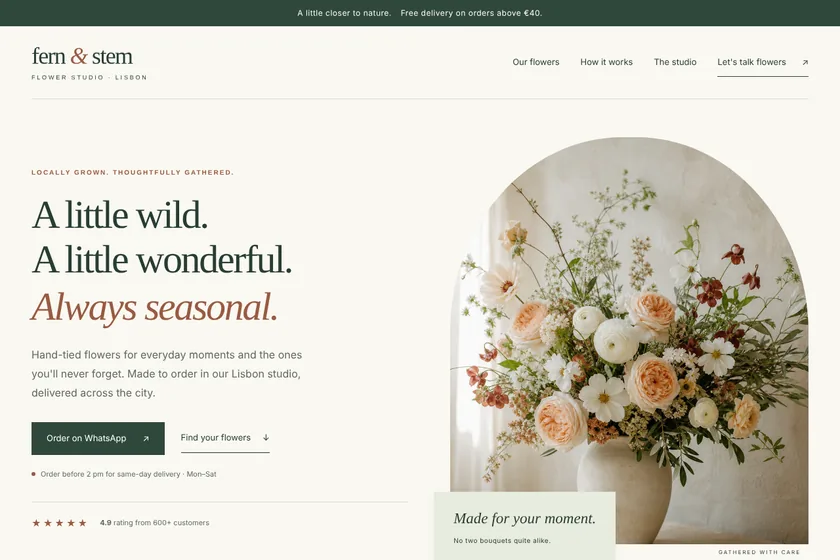
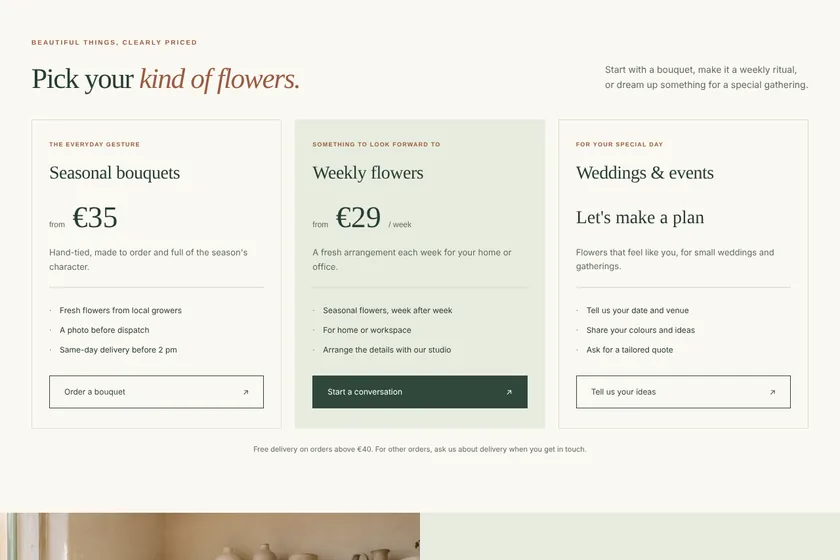
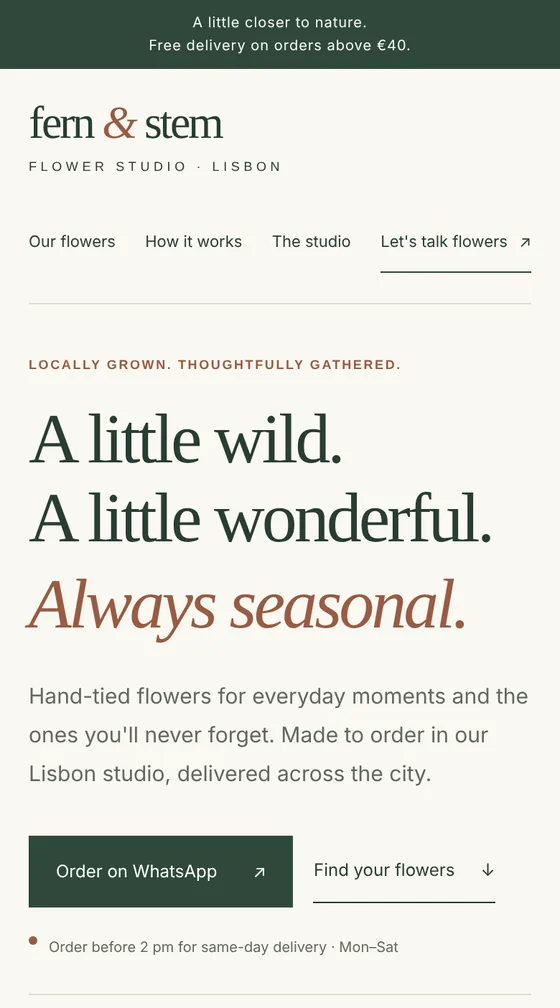
Landing page of a flower studio in Lisbon
The page on a computer
The same page on a phone
Files: a ZIP archive with index.html, the styles, a little JavaScript and 5 pictures drawn for the page: 8 sections, ready to upload to the client's hosting. The pictures here are screenshots of the page.
Client: Fern & Stem, a small flower studio that delivers bouquets across Lisbon. Task: a landing page with their bouquets, weekly subscription and event flowers, prices, delivery terms and WhatsApp ordering, in cream, sage and terracotta.
The client and all details are made up.
About this service
People buy flowers in a hurry, so a florist's page has to show bouquets, prices and the order button within seconds, on a phone first. We build it from your brief: bouquets by occasion, wedding flowers or flowers for offices if you do them, your delivery area and times, how to order and how to keep the flowers fresh. The pictures we draw set the mood; your real bouquets come from photos you upload. The «Order» button opens WhatsApp, a messenger or a call, or leads to the shop link you already use: the page has no cart and takes no payments. We never invent prices or delivery terms. You get the code in a ZIP; hosting and a domain are not included.
What is included
- What you getA ZIP with index.html, styles and pictures, plus a preview on the order page
- Bouquets by occasionBirthdays, dates, apologies, holidays: grouped as you sell them
- Delivery blockYour area, times and terms, written only from your facts
- Order buttonsWhatsApp, a messenger, a call or your existing shop link
- Your bouquet photosUp to 5 photos placed in the page, next to drawn pictures
- Quick on phonesLight pages that open fast from social networks and ads
How it works
- 1BriefYou list your bouquets, prices, delivery and contacts
- 2PageWe write the texts, draw the pictures and build the page
- 3Preview and archiveYou check it on a phone, ask for changes and download the ZIP
What we need from you
Which bouquets and arrangements you make and for which occasions, prices or «from» prices, the delivery area, times and cost, pick-up address if you have one, and how people order: WhatsApp, Telegram, phone or a link to your shop. Optionally up to 5 pictures as PNG, JPEG or WebP: your logo and photos of your own bouquets.
We will ask you:
- Which bouquets and occasions should the page show?
- Prices and delivery
- How do people order?
- Colours and style you like
Compare packages
| Packages | BasicFlorist landing of 5 sections$21 | StandardLanding of 8 sections with prices$39 | PremiumLanding of 12 sections for holidays$67 |
|---|---|---|---|
| Deadline | 1 day | 2 days | 2 days |
| Revisions | 1 | 2 | 3 |
| Pages | 1 | 1 | 1 |
| Sections | up to 5 | up to 8 | up to 12 |
| Pictures drawn for the page | 3 | 5 | 8 |
| Phone version | Yes | Yes | Yes |
| Order Basic | Order Standard | Order Premium |
Payment protection
You pay when you order, but the money is released only for accepted work.
- Fixed priceThe package price does not change after you pay.
- The money is reservedWhen you pay, the amount is only reserved. It is released to the service once you accept the work.
- Checked before deliveryEvery result goes through a quality check before it reaches you, and you see it on the order page before accepting it.
- Free revisionsAsk for changes within your brief as many times as the package allows.
- Acceptance after 3 daysIf within 3 days of delivery you neither accept the work nor ask for changes, it is accepted automatically. If you write in the order chat after delivery, the order waits; once we answer, we may start the 3 days again and will say so in the chat.
- Redo or a full refundIf the result does not match your brief and the revisions did not fix it, or the work takes more than twice its deadline, write in the order chat: we will redo the work or refund the payment in full.
Questions and answers
Can people pay for a bouquet on the page?
No. The page has no cart and no payments. The «Order» button opens a chat or a call, or leads to the shop or payment link you already use.
Will the drawn pictures look like my bouquets?
They are illustrations in your colours and style, not photos of your work. To show what people really get, upload photos of your own bouquets and we put them on the page.
How do I change prices before the 8th of March or Valentine's Day?
Prices are plain text in the HTML, so you can change them in any code editor. Within your package you can also ask us for changes on the order page.
Can the page show a catalogue of all my bouquets?
A landing shows a selection: a few bouquets per occasion within your package's sections. A full catalogue with filters and a cart is an online shop, which this service does not make.
How do I put the page online?
Upload the archive's contents to your hosting so that index.html is at the top of the site. Hosting and a domain are not included, and we do not log in to your accounts.
Did not find your answer?