 Development
Photoshop to HTML
Your Photoshop design built in HTML and CSS: a page from your exported layout, with a phone version
Pricefrom $21
The money is reserved when you pay and released only once you accept the work.
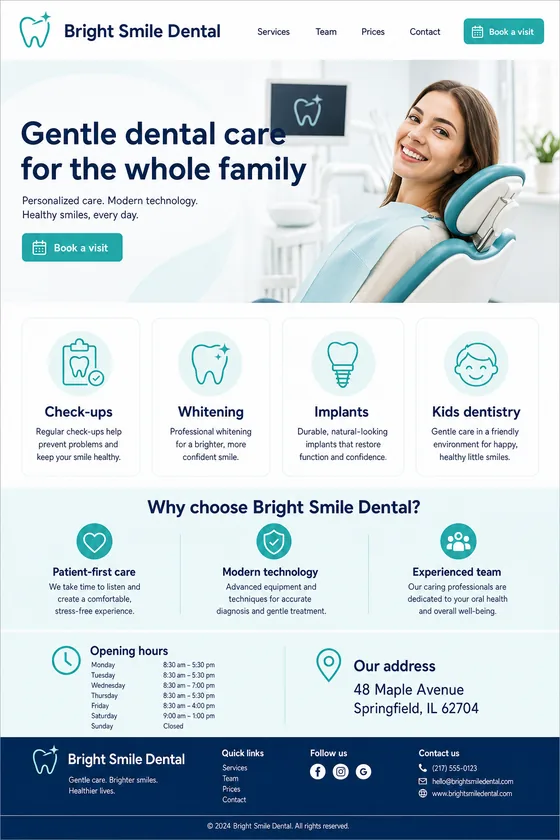
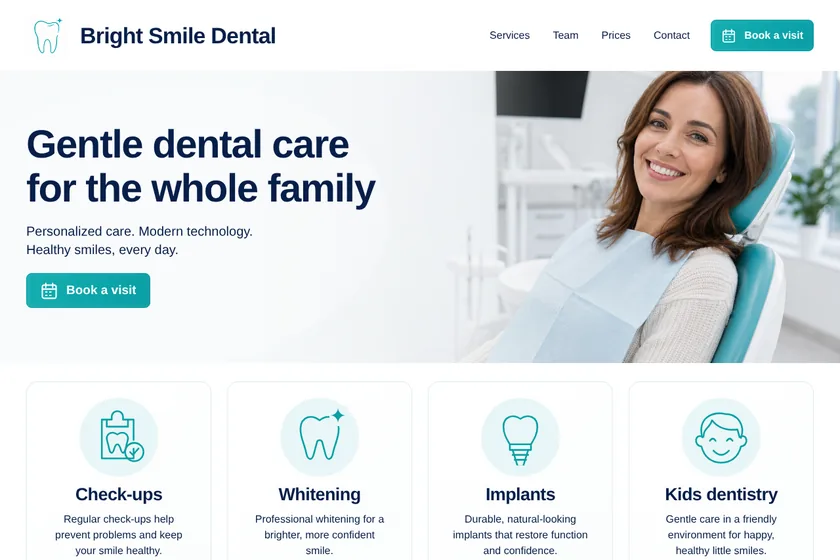

Files: a ZIP archive with index.html, the styles and 2 pictures for the page, ready to upload to the client's hosting. The pictures here are screenshots of the page.
Client: Bright Smile Dental. Task: turn the home page design into a working HTML page with the same layout, colours and texts, and booking buttons that call the clinic.
The client and all details are made up.
Your design is ready in Figma and you need it as a working page. Export the frames as PNG at 1x or 2x and upload them, and we build them in HTML and CSS: the same sections, grid, spacing, colours and buttons, with real text instead of a picture of text. If you have a mobile frame, we follow it; if not, we make the phone version from the desktop frame. We cannot open .fig files or Figma links, so layers, components, variants and prototype links are not read: anything not visible in the export, such as hover colours, goes into the brief. Photos are drawn anew unless you upload them. No animations, back end, CMS or hosting.
Up to 5 pictures as PNG, JPEG or WebP: frames exported from Figma at 1x or 2x, one page per file, plus, if you like, photos, illustrations or your logo exported separately to use as they are. Say which frame is which page, the names of the fonts you used, hover or open states not shown in the export, and where each button leads. Not .fig files or Figma links.
We will ask you:
| Packages | Basic1 Figma frame, up to 5 sections$21 | Standard1 Figma frame, up to 10 sections$39 | PremiumUp to 3 Figma frames$67 |
|---|---|---|---|
| Deadline | 1 day | 2 days | 3 days |
| Revisions | 1 | 2 | 3 |
| Pages | 1 | 1 | 3 |
| Sections | up to 5 | up to 10 | up to 8 per page |
| Pictures drawn for the page | 2 | 4 | — |
| Phone version | Yes | Yes | Yes |
| What to upload | PNG export of frames | PNG export of frames | PNG export of frames |
| Pictures drawn for the pages | — | — | 6 |
| Order Basic | Order Standard | Order Premium |
You pay when you order, but the money is released only for accepted work.
Select the frame, add an export setting in the Export section of the right panel, choose PNG at 1x or 2x and click Export. A long page can be one tall frame; very tall frames export better at 1x.
No, we work only with uploaded pictures, not links or .fig files, and we do not log in to your accounts.
Pages use system fonts that look close to yours, since nothing is loaded from other sites. Tell us the font names so we pick the nearest ones; you can add the web font files later if your licence allows it.
It will be close in layout, colours, sizes and the order of sections, but not to the pixel: fonts are similar system fonts, and photos are drawn anew unless you upload your own. Revisions fix what matters to you.
Links, buttons and the phone menu work. Prototype flows, overlays, animations and transitions are not part of this service.
Did not find your answer?
Development Development
 Development
 Development