Payment protectionDetails
- Revisions within the package are free.
- If you do not respond within 3 days of delivery, the work is accepted automatically.
The money is reserved when you pay and released only once you accept the work.
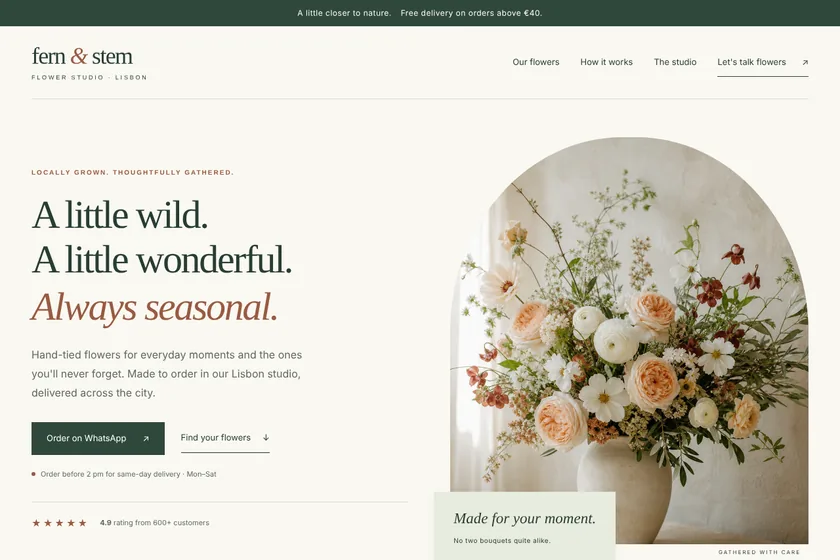
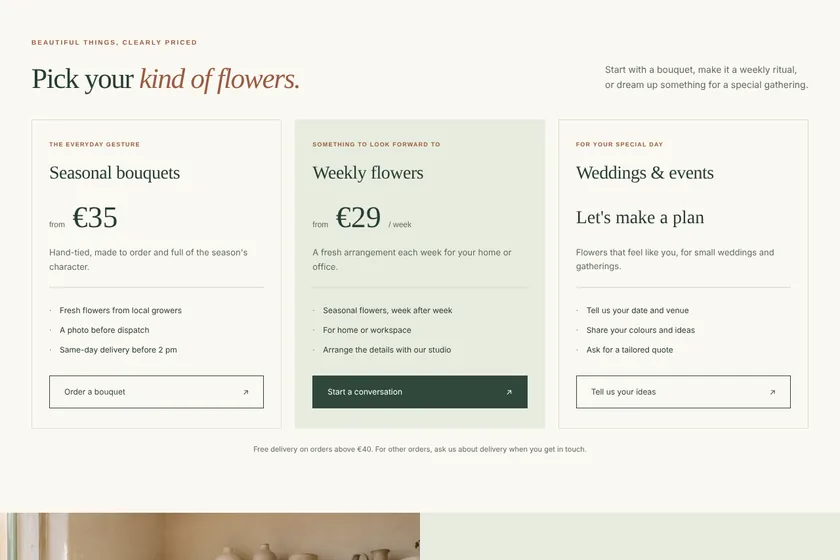
Example result
Landing page of a flower studio in Lisbon
The page on a computer
The same page on a phone
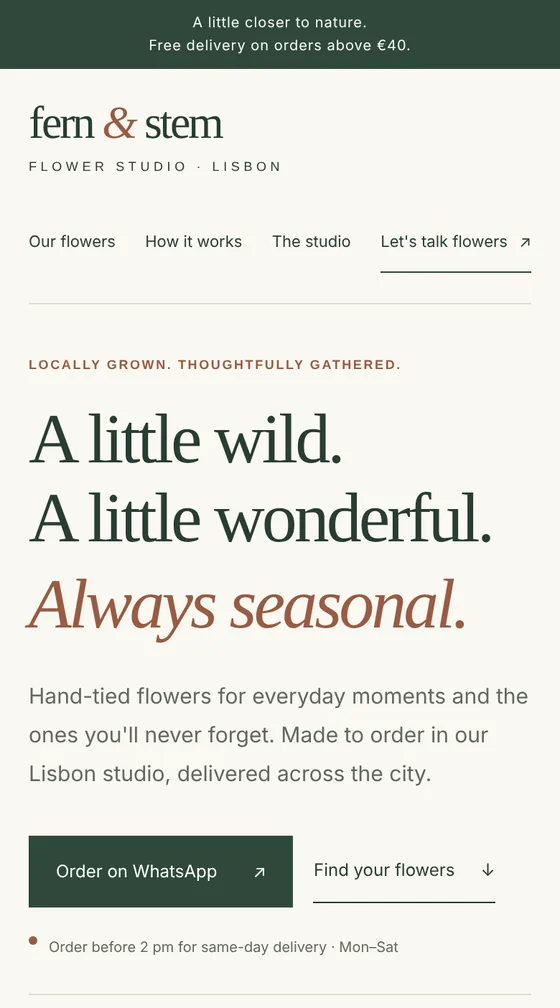
Files: a ZIP archive with index.html, the styles, a little JavaScript and 5 pictures drawn for the page: 8 sections, ready to upload to the client's hosting. The pictures here are screenshots of the page.
Client: Fern & Stem, a small flower studio that delivers bouquets across Lisbon. Task: a landing page with their bouquets, weekly subscription and event flowers, prices, delivery terms and WhatsApp ordering, in cream, sage and terracotta.
The client and all details are made up.
About this service
A webinar page has a few days to do its job: get the right people to sign up and turn up. It states the topic and what the talk gives in your words, the date and time with the time zone, the programme, who it is for, the speaker and what participants get. The sign-up button leads to the registration on your webinar platform, a messenger channel or a chat where you send the link; the page itself does not collect emails, send reminders or show the stream. After the event, the date and texts are easy to change in the code for the next one. We never invent speaker titles, attendee numbers or reviews.
What is included
- What you getA ZIP archive with index.html, the styles and the pictures, ready for your hosting, and a preview on the order page. Hosting and the domain stay on your side. You get code, not a Figma or Photoshop file.
- Date and timeLarge and clear, with the time zone and length
- ProgrammeWhat you cover, part by part
- SpeakerBio and photo from you
- Why join liveA gift, Q&A or recording: only what you really offer
- Ready for adsA short page that opens fast on phones
How it works
- 1BriefYou send the topic, date, programme, speaker and sign-up link
- 2PageWe write the texts, draw the pictures and build the page
- 3Preview and archiveYou check the date and the link, ask for changes within your package and download the ZIP
What we need from you
The topic and who the webinar is for, what people will learn, the date, start time, time zone and length, the programme, each speaker's name, role and short bio as they should read, what participants get, the price if it is paid, and the link where people sign up or the messenger channel you use. Up to 5 pictures as PNG, JPEG or WebP: your logo and speaker photos you have the right to use.
We will ask you:
- What is the webinar about, and for whom?
- When does it start?
- Who is speaking?
- What do participants get?
- Where do people sign up?
Compare packages
| Packages | BasicWebinar page, 5 sections$21 | StandardWebinar page, 8 sections$37 | PremiumWebinar page, 12 sections$65 |
|---|---|---|---|
| Deadline | 1 day | 2 days | 2 days |
| Revisions | 1 | 2 | 3 |
| Pages | 1 | 1 | 1 |
| Sections | up to 5 | up to 8 | up to 12 |
| Pictures drawn for the page | 3 | 5 | 8 |
| Phone version | Yes | Yes | Yes |
| Sign-up button | to your webinar link or messenger | to your webinar link or messenger | to your webinar link or messenger |
| Order Basic | Order Standard | Order Premium |
Payment protection
You pay when you order, but the money is released only for accepted work.
- Fixed priceThe package price does not change after you pay.
- The money is reservedWhen you pay, the amount is only reserved. It is released to the service once you accept the work.
- Checked before deliveryEvery result goes through a quality check before it reaches you, and you see it on the order page before accepting it.
- Free revisionsAsk for changes within your brief as many times as the package allows.
- Acceptance after 3 daysIf within 3 days of delivery you neither accept the work nor ask for changes, it is accepted automatically. If you write in the order chat after delivery, the order waits; once we answer, we may start the 3 days again and will say so in the chat.
- Redo or a full refundIf the result does not match your brief and the revisions did not fix it, or the work takes more than twice its deadline, write in the order chat: we will redo the work or refund the payment in full.
Questions and answers
Will the page collect emails and send reminders?
No. Without a server the page cannot store sign-ups or send anything. Registration and reminders stay on your webinar platform or mailing service, and the button leads there.
Can the webinar be shown on the page itself?
No. The stream runs on your webinar platform; the page tells people about it and sends them to sign up.
Can you show how many people have signed up?
The page cannot count sign-ups, and we do not write invented numbers. If you want a figure from a past event, send the real one.
Can I reuse the page for the next webinar?
Yes. The date, topic and speaker are plain text in the code; change them for the next event or order changes within your package.
How do I put the page online?
Upload the contents of the archive to your hosting so that index.html is at the top of the site. Hosting and a domain are not part of the order, and we do not log in to your accounts. Do it a few days before you start the ads so you can check the sign-up link.
Did not find your answer?