Payment protectionDetails
- Revisions within the package are free.
- If you do not respond within 3 days of delivery, the work is accepted automatically.
The money is reserved when you pay and released only once you accept the work.

Example result
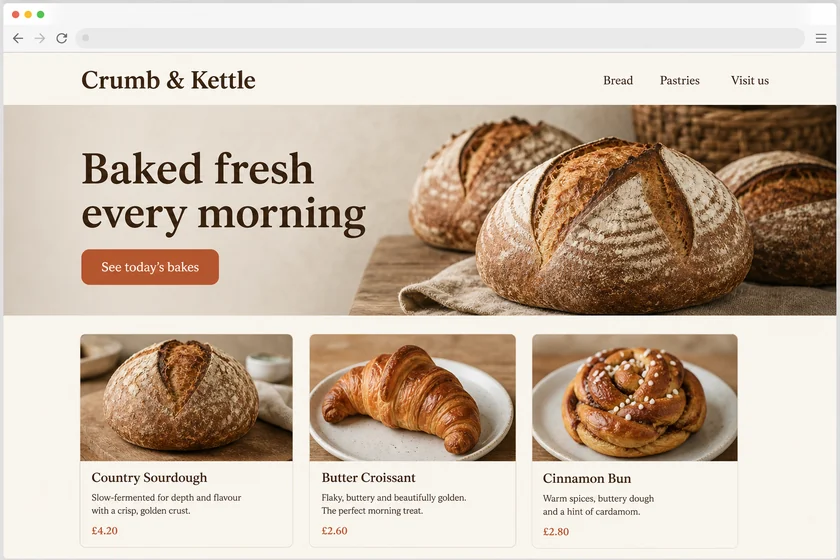
Mobile version of a bakery site from a desktop screenshot
Before: the desktop homepage
After: the phone screen
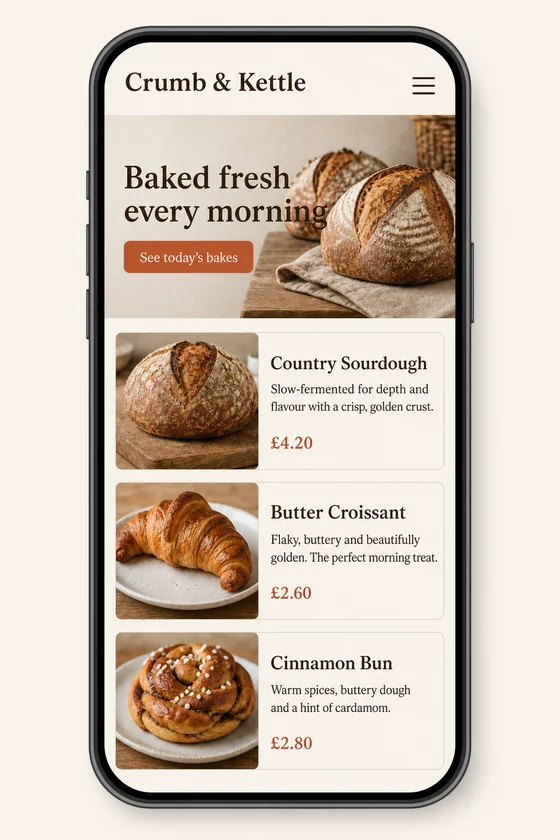
File: PNG mock-up, about 1.5 megapixels. A picture of the design for the client's developer, not HTML code or a Figma file.
Client: Crumb & Kettle, a neighbourhood bakery. Task: show how their homepage should look on a phone, keeping the fonts, colours, button and photos of the desktop site.
The client and all details are made up.
About this service
If you run webinars regularly, each sign-up page should look like the rest of your brand and like the last one, with only the topic, date and speaker changing. Upload a screenshot of your site or a past webinar page and we draw a new sign-up page in its style: title and date with the time zone, the speaker's photo frame and short bio, three things people will learn, a short form and a thank-you screen with an add-to-calendar button. You get PNG pictures, not a page in your webinar tool or code; each is made from one of your screenshots at about 1.5 megapixels in its shape, wide from a desktop capture and tall from a phone one.
What is included
- What you getYou get 1, 3 or 5 PNG mock-ups of your webinar sign-up page in your own style, such as the sign-up screen, the speaker and topics block and the thank-you screen. They are redrawn from your screenshot, so fonts, icons and photos may change slightly.
- Date, time and time zoneWritten exactly as you send them
- Speaker blockPhoto frame, name, role and one line
- What you will learnThree or four short points
- Short formName and email, or the fields your tool asks for
- Thank-you screenConfirmation with add-to-calendar and share buttons
How it works
- 1Your styleYou upload your site or last webinar page and the new details
- 2Sign-up pageWe draw the page and thank-you screen in your style
- 3RevisionsYou check dates and names and ask for changes within your package
What we need from you
Up to 5 sharp screenshots as PNG, JPEG or WebP (no PDF), one screen each: your site or a past webinar page. Write the webinar title, date, time and time zone, the speaker's name and role, three or four learning points and the form fields exactly. If you send fewer screenshots than your package has, the extra pictures are further variants from the same file. Send only files you have the right to use; we don't recreate certificates of attendance or other official documents.
We will ask you:
- What is the webinar's title, date and time?
- Who is speaking?
- What will people learn?
- Which screenshot shows your style?
Compare packages
| Packages | Basic1 sign-up screen$10 | Standard3 mock-ups$22 | Premium5 mock-ups$39 |
|---|---|---|---|
| Deadline | 1 day | 1 day | 2 days |
| Revisions | 1 | 2 | 3 |
| Mock-ups | 1 | 3 | 5 |
| Format | PNG | PNG | PNG |
| Screens | your choice | your choice | your choice |
| Order Basic | Order Standard | Order Premium |
Payment protection
You pay when you order, but the money is released only for accepted work.
- Fixed priceThe package price does not change after you pay.
- The money is reservedWhen you pay, the amount is only reserved. It is released to the service once you accept the work.
- Checked before deliveryEvery result goes through a quality check before it reaches you, and you see it on the order page before accepting it.
- Free revisionsAsk for changes within your brief as many times as the package allows.
- Acceptance after 3 daysIf within 3 days of delivery you neither accept the work nor ask for changes, it is accepted automatically. If you write in the order chat after delivery, the order waits; once we answer, we may start the 3 days again and will say so in the chat.
- Redo or a full refundIf the result does not match your brief and the revisions did not fix it, or the work takes more than twice its deadline, write in the order chat: we will redo the work or refund the payment in full.
Questions and answers
Can you redo the page for each new webinar?
Yes: send last time's mock-up or page as the screenshot, with the new title, date and speaker in the brief, and we keep everything else in the same style. The 3 and 5 mock-up packages suit a series of sessions.
Will the sign-up form connect to my webinar platform?
No, it is a picture of the form. Your webinar or email tool handles real registrations and reminders; we don't log in or set anything up.
Can the speaker's real photo be used?
If the speaker appears in your screenshot, their photo can carry over, close but not identical; otherwise there is a placeholder frame for the real photo. We never put someone else in place of your speaker.
Will the date and time be correct?
We write them exactly as you send them, but small text can come out imperfect, so check dates, times and the time zone in every picture; Latin-script languages work best. We add no fake attendee numbers or ratings, and no partner or other brands' logos.
Did not find your answer?