 Design
Mobile landing
Mobile version of your desktop landing page
Pricefrom $10
The money is reserved when you pay and released only once you accept the work.
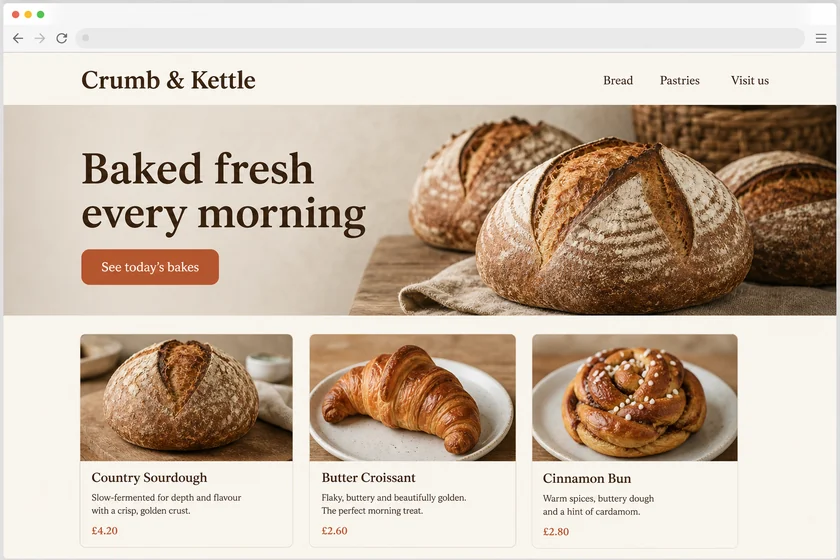
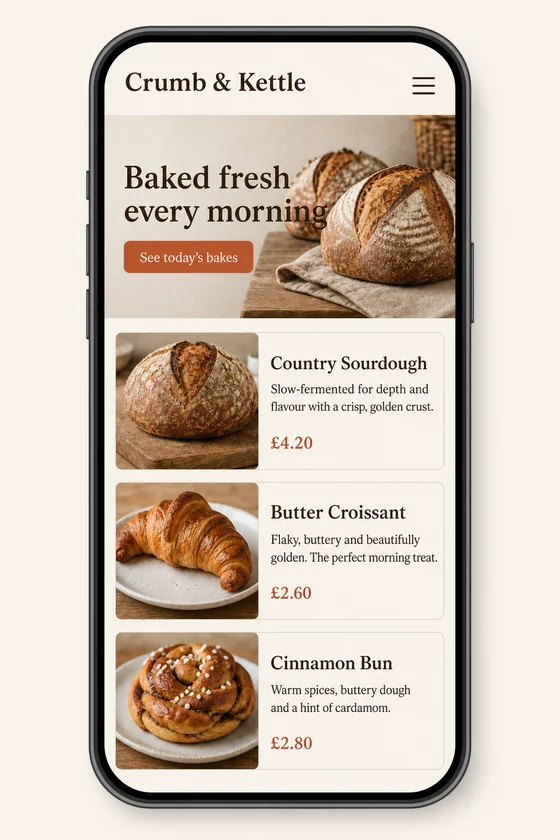
File: PNG mock-up, about 1.5 megapixels. A picture of the design for the client's developer, not HTML code or a Figma file.
Client: Crumb & Kettle, a neighbourhood bakery. Task: show how their homepage should look on a phone, keeping the fonts, colours, button and photos of the desktop site.
The client and all details are made up.
Checkout is where phone shoppers give up most easily, so each step should ask for little: contact, delivery, payment and a final review, with large fields, the order total always visible and one clear button to continue. We draw your mobile checkout screens in the style of your shop screenshot, with a progress bar, delivery choices, a payment step with placeholder card fields and an order summary, in your colours and wording. Each picture is made from one of your screenshots as an upright 2:3 PNG mock-up of about 1.5 megapixels, whatever the shape of the upload; it shows how checkout could look, not working code, a payment setup or a Figma file.
Up to 5 sharp screenshots as PNG, JPEG or WebP (no PDF): your cart or checkout, any page of your shop, or a sample used only for its style, all files you have the right to use. List the steps you want, the delivery options and fees and the button labels exactly as they should read; card numbers and addresses appear as placeholders, so never send real customer data.
We will ask you:
| Packages | Basic1 mobile screen$10 | Standard3 mobile screens$22 | Premium5 mobile screens$39 |
|---|---|---|---|
| Deadline | 1 day | 1 day | 2 days |
| Revisions | 1 | 2 | 3 |
| Mock-ups | 1 | 3 | 5 |
| Format | PNG | PNG | PNG |
| Screens | your choice | your choice | your choice |
| Order Basic | Order Standard | Order Premium |
You pay when you order, but the money is released only for accepted work.
We don't draw other brands' logos, so express payment buttons appear as neutral placeholders that your developer later replaces with the real ones from your payment provider. Card fields show sample placeholders, never real card data; we don't recreate receipts, documents or official forms, and we add no fake reviews or trust badges.
That depends on your platform and plan: on some, such as Shopify, the checkout can be styled only within set limits, so check what yours currently allows. You get PNG pictures, not code, not a Figma file and not a checkout app; we don't install or change anything in your shop.
Yes. Every picture here is an upright 2:3 phone screen of about 1024 x 1536 pixels, whatever the shape of the upload, so your desktop shop is redrawn as mobile checkout steps in its colours. A long checkout step is shown in a compact form.
Short labels and the numbers you give us are drawn into the picture, but small text can come out imperfect and Latin-script text works best, so check every price and word yourself. The picture is redrawn, so icons and your logo can shift slightly; ask for a revision where needed.
Did not find your answer?
Design Design
 Design
 Design