 Design
Desktop to mobile
Mobile version of your site from a desktop screenshot
Pricefrom $10
The money is reserved when you pay and released only once you accept the work.
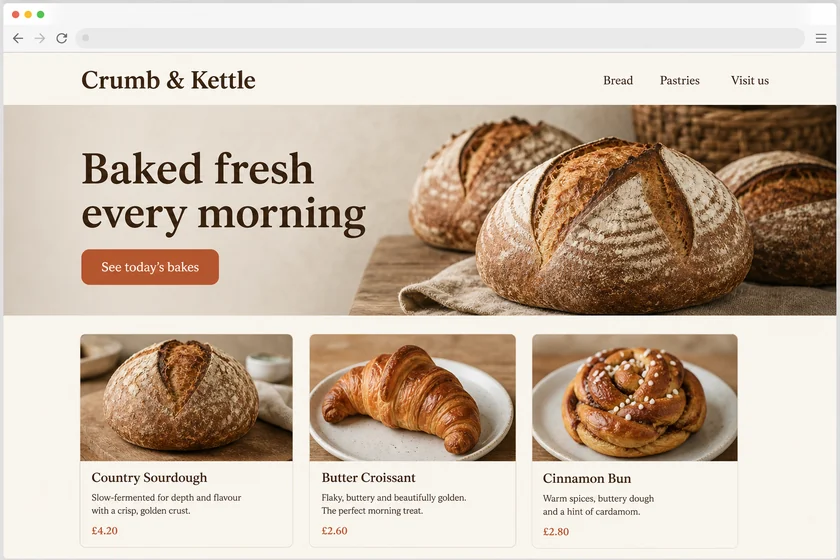
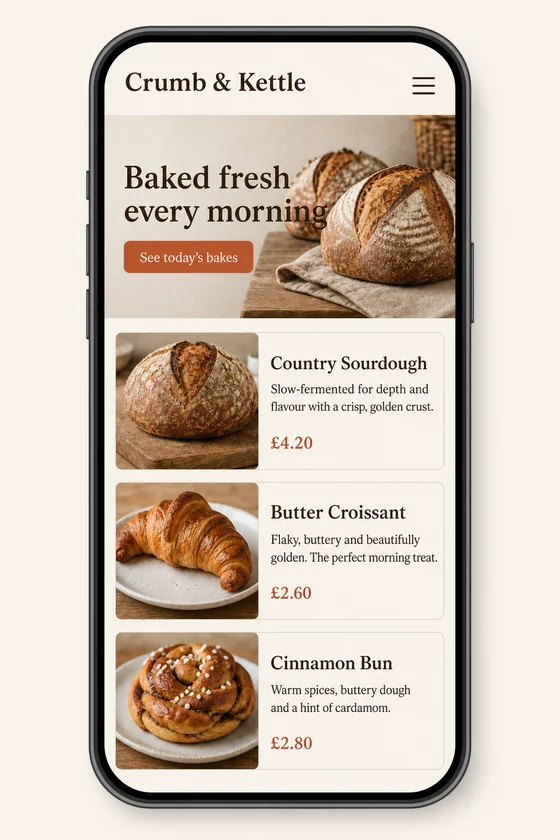
File: PNG mock-up, about 1.5 megapixels. A picture of the design for the client's developer, not HTML code or a Figma file.
Client: Crumb & Kettle, a neighbourhood bakery. Task: show how their homepage should look on a phone, keeping the fonts, colours, button and photos of the desktop site.
The client and all details are made up.
People open a contact page on their phone to do one thing quickly: call, write, find the address or check today's hours, so the phone number should be a big tap-to-call button and the address should sit next to a map and a route link. We draw your contact page for a phone in the style of your site screenshot, with call and email buttons, a map area, opening hours, a short contact form and links to your messengers or social pages. Each picture comes from one of your screenshots as an upright 2:3 PNG mock-up of about 1.5 megapixels, whatever the shape of the upload, so a desktop page screenshot is fine; it is a picture to build from, not code or a Figma file.
Up to 5 sharp screenshots as PNG, JPEG or WebP (no PDF) of your site, from pages you have the right to use, or a sample used only for its style. Send your phone, email, address, hours and button labels exactly as they should read, and list your locations if you have more than one.
We will ask you:
| Packages | Basic1 mobile screen$10 | Standard3 mobile screens$22 | Premium5 mobile screens$39 |
|---|---|---|---|
| Deadline | 1 day | 1 day | 2 days |
| Revisions | 1 | 2 | 3 |
| Mock-ups | 1 | 3 | 5 |
| Format | PNG | PNG | PNG |
| Screens | your choice | your choice | your choice |
| Order Basic | Order Standard | Order Premium |
You pay when you order, but the money is released only for accepted work.
The map is a simple drawn area with your address and a route button, not a real map service and not its logo. Your developer later embeds the live map from your map provider. The picture is redrawn, so small icons and your logo can shift slightly.
We don't draw other brands' logos, so messenger and social links appear as neutral buttons with their names in plain text. Your own logo and photos are fine if you have the right to use them; we never change documents or official forms or add fake reviews or ratings.
Numbers, emails and hours you give us are drawn into the picture, but small text can come out imperfect and Latin-script text works best, so check every digit. Each picture is an upright 2:3 phone screen, even from a wide desktop screenshot.
You get a PNG picture, not HTML or CSS code, not a Figma file and not a WordPress, Wix, Squarespace or Webflow page. Your developer or you build the page from it; we don't change anything on your site.
Did not find your answer?
Design Design
 Design
 Design