 Design
Company timeline
Company history timeline infographic
Pricefrom $9
The money is reserved when you pay and released only once you accept the work.
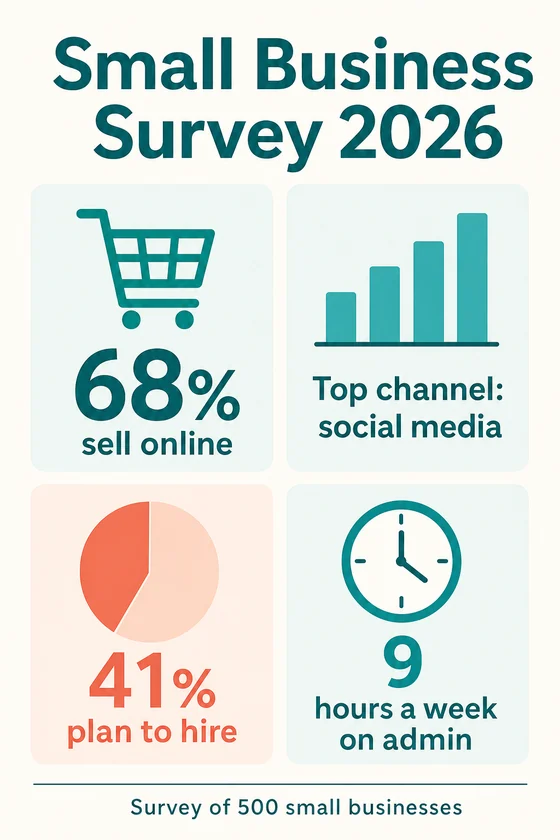
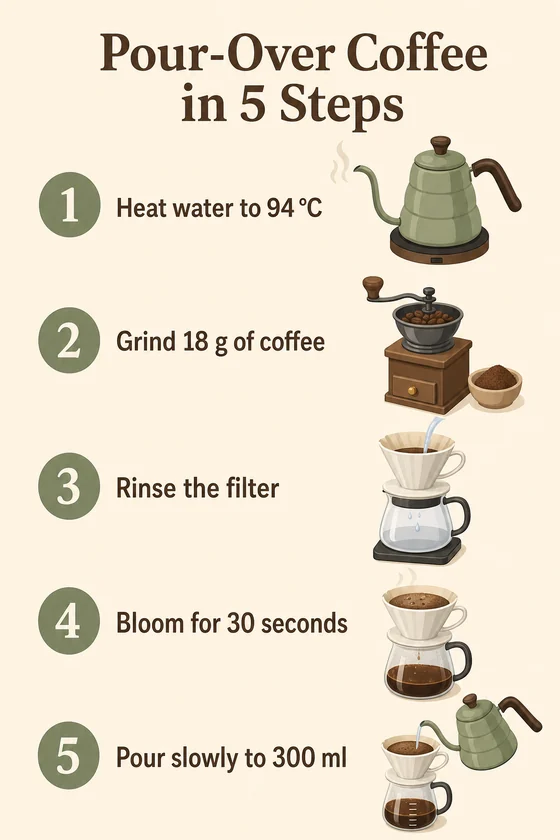
File: PNG, 1024x1536. Text and numbers come only from the client's brief; the client checks them before using the picture.
Client: a small business association and a coffee shop. Task: an infographic of survey results with the four figures they sent, and a five-step brewing guide for the counter and Pinterest.
The client and all details are made up.
A process infographic shows how work moves from start to finish, such as how an order is handled, how a claim is processed or how a new client is onboarded, as numbered steps joined by arrows. We draw each step from your brief as a short label with an icon and, where you give it, who does it or how long it takes, in a top-to-bottom flow that suits a tall picture; a simple yes-or-no branch fits, while a large flowchart with many loops is better split into several pictures. The picture is 1024 x 1536 with only your wording, so keep each step to a few words and check it; Latin-script languages work best.
The name of the process and every step in order, a few words each, up to about 8-10 steps; for each step, if needed, who does it and how long it takes; any decision point and its two outcomes; your colours and the language; and where the picture will be used.
We will ask you:
| Packages | Basic1 process diagram$9 | Standard3 process diagrams$19 | Premium5 process diagrams$35 |
|---|---|---|---|
| Deadline | 1 day | 1 day | 2 days |
| Revisions | 1 | 2 | 3 |
| Infographics | 1 | 3 | 5 |
| Format | PNG | PNG | PNG |
| Text | a title + up to 10 short blocks | a title + up to 10 short blocks | a title + up to 10 short blocks |
| Order Basic | Order Standard | Order Premium |
You pay when you order, but the money is released only for accepted work.
One picture holds up to about 8-10 short steps, so group small steps together or split the process into stages, one infographic each, with 3 or 5 in one style.
No, you get a PNG picture, not a Visio, Miro, Figma or PowerPoint file. To change a step, ask for a revision within your package.
Yes, such as "2 days" or a small bar for the share of orders at that step. Any chart is illustrative, so the exact number is written next to it.
It is 1024 x 1536 pixels: fine on screens and on paper up to A4, such as an onboarding handout, but it is not a print-ready file and is too small for a poster.
Did not find your answer?
Design Design
 Design
 Design