Event agendaOriginal

Event agenda infographic

Usually ready in 15 minutesRevisions includedQuality check
Packages
Payment protectionDetails
  • Revisions within the package are free.
  • If you do not respond within 3 days of delivery, the work is accepted automatically.

The money is reserved when you pay and released only once you accept the work.

Event agenda infographic

Example result

Example for the Standard package

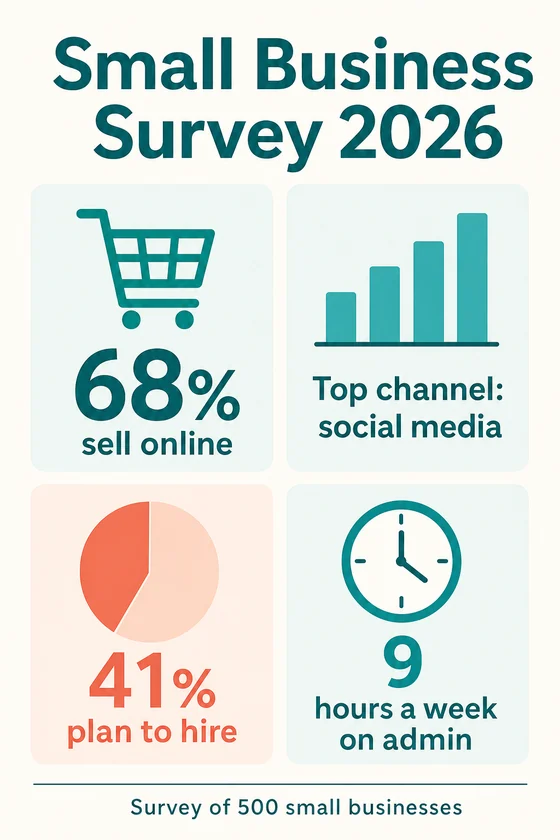
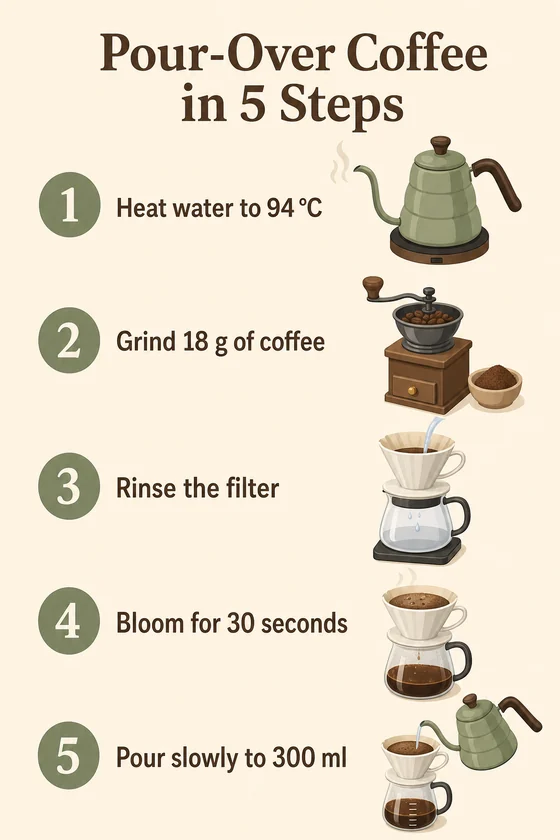
Two infographics from a client's facts

Survey results

The survey infographic

How-to guide

The five-step guide

File: PNG, 1024x1536. Text and numbers come only from the client's brief; the client checks them before using the picture.

Client: a small business association and a coffee shop. Task: an infographic of survey results with the four figures they sent, and a five-step brewing guide for the counter and Pinterest.

The client and all details are made up.

About this service

An agenda infographic tells attendees where to be and when: the event name, date and venue, then each session with its start time, title and speaker, plus breaks, lunch and networking. We lay out your schedule as a clear time column down the tall picture with small icons for talks, workshops and breaks, so it reads well on a phone or a small printout. Times and names appear exactly as you send them in a 1024 x 1536 picture, so check each one; it holds about 8-10 slots, and Latin-script languages work best.

What is included

  • What you getYou get 1, 3 or 5 tall PNG agenda infographics of 1024 x 1536 pixels, such as one per day or per track, for email, social posts or the event page. Each is a finished picture, not an editable file.
  • Time columnStart times in order down the picture
  • Session blocksTitle and speaker for each slot, as you send them
  • Breaks markedCoffee, lunch and networking with their own icons
  • Day or track splitOne picture per day or track in Standard and Premium
  • Space for a QR codeA clear area where you add a working code yourself

How it works

  1. 1
    ScheduleYou send the event details and every slot
  2. 2
    LayoutWe arrange times, sessions and icons and draw the agenda
  3. 3
    RevisionsYou check each time and name and ask for changes within your package

What we need from you

The event name, date, venue and time zone if attendees join online; every slot in order with its start time, session title and speaker name, up to about 8-10 slots per picture; breaks and networking; your event colours and the language. For a multi-day event, say how to split the days.

We will ask you:

  • What is the event, and when and where is it?
  • What are the slots, in order?
  • Should it be split by day or by track?
  • Which colours and language?

Compare packages

PackagesBasic1 agenda$9Standard3 agendas$19Premium5 agendas$35
Deadline1 day1 day2 days
Revisions123
Infographics135
FormatPNGPNGPNG
Texta title + up to 10 short blocksa title + up to 10 short blocksa title + up to 10 short blocks
Order BasicOrder StandardOrder Premium

Payment protection

You pay when you order, but the money is released only for accepted work.

  • Fixed priceThe package price does not change after you pay.
  • The money is reservedWhen you pay, the amount is only reserved. It is released to the service once you accept the work.
  • Checked before deliveryEvery result goes through a quality check before it reaches you, and you see it on the order page before accepting it.
  • Free revisionsAsk for changes within your brief as many times as the package allows.
  • Acceptance after 3 daysIf within 3 days of delivery you neither accept the work nor ask for changes, it is accepted automatically. If you write in the order chat after delivery, the order waits; once we answer, we may start the 3 days again and will say so in the chat.
  • Redo or a full refundIf the result does not match your brief and the revisions did not fix it, or the work takes more than twice its deadline, write in the order chat: we will redo the work or refund the payment in full.
How it works →

Questions and answers

Can you add a QR code for registration?

A drawn QR code would not scan, so we leave a clear space instead; add your real code there yourself with any image editor before you share the picture.

The schedule may change. What then?

Ask for the change as a revision within your package; text is part of the picture, so it is redrawn with the new times. After your revisions are used, a new order covers further updates.

Can I print it for the venue?

As A4 or smaller handouts and table cards, yes. It is not a print-ready file (no bleed, CMYK or vector) and is too small for banners.

Did not find your answer?

Packages