 Design
Onboarding in your style
Onboarding screens in your app's style
Pricefrom $10
The money is reserved when you pay and released only once you accept the work.
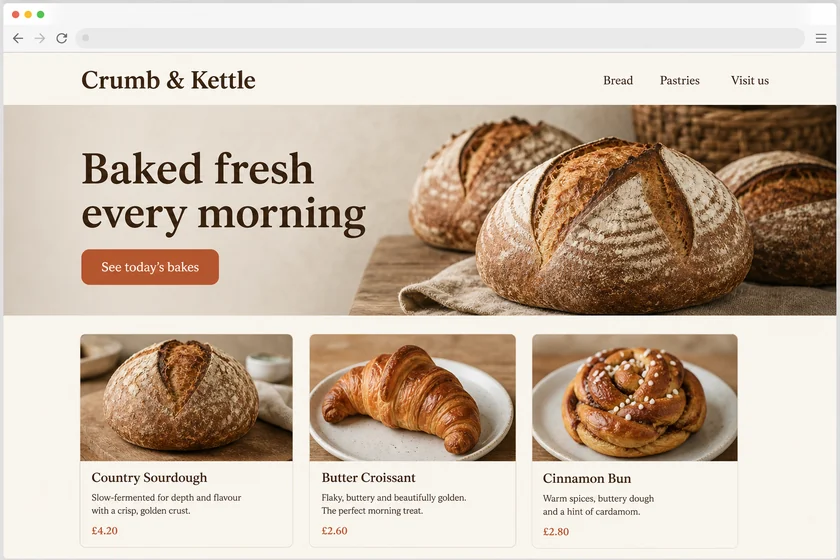
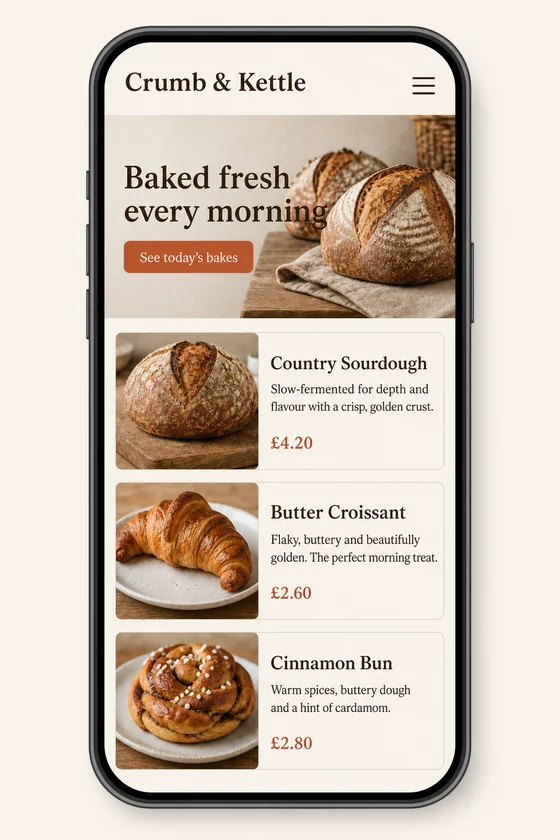
File: PNG mock-up, about 1.5 megapixels. A picture of the design for the client's developer, not HTML code or a Figma file.
Client: Crumb & Kettle, a neighbourhood bakery. Task: show how their homepage should look on a phone, keeping the fonts, colours, button and photos of the desktop site.
The client and all details are made up.
A chat screen should feel effortless: a header with the contact's name, avatar and status, message bubbles in two colours with times and read marks, date separators, a typing indicator, attachments such as photos or files, and an input bar with a send button, and many apps also need a conversation list with unread counts. Upload a screenshot of your app, and we draw the chat in its colours, fonts, bubble shapes and icons, with short sample messages from your brief. You get PNG mock-ups of about 1.5 megapixels, each made from one of your screenshots and always upright 2:3, about 1024 x 1536 pixels, whatever the shape of your upload, so even a wide screenshot becomes a phone screen; they are not app code, a working messenger or a Figma, Sketch or XD file.
Up to 5 sharp screenshots of your app as PNG, JPEG or WebP (no PDF), one screen each, and only files you have the right to use; a chat from another app guides only the style. Give six to ten short made-up messages with times and sample names, and say which extras you need, such as attachments or a typing indicator; Latin-script languages draw most cleanly.
We will ask you:
| Packages | Basic1 chat screen$10 | Standard3 screens$22 | Premium5 screens$39 |
|---|---|---|---|
| Deadline | 1 day | 1 day | 2 days |
| Revisions | 1 | 2 | 3 |
| Mock-ups | 1 | 3 | 5 |
| Format | PNG | PNG | PNG |
| Screens | your choice | your choice | your choice |
| Order Basic | Order Standard | Order Premium |
You pay when you order, but the money is released only for accepted work.
About six to ten short messages read well on a phone screen. Long messages turn into small text that can come out imperfect, so keep sample lines brief, and check the spelling in the result.
Please use made-up sample messages, not real people's chats or personal data. Avatars are neutral placeholders such as initials or simple drawn figures, never real people or celebrities.
No, the mock-up is a still PNG picture, not app code, a chat service or a Figma, Sketch or XD file. Your developer builds the screen and connects it to your messaging service.
No other brands' logos, including other messengers' icons, no invented reviews or ratings, and no changed documents or receipts shown as attachments. A chat from another app is used only for its style, and the picture is redrawn, so small icons and your logo may shift slightly.
Did not find your answer?
Design Design
 Design
 Design