 Design
Notifications in your style
Notifications screen in your app's style
Pricefrom $10
The money is reserved when you pay and released only once you accept the work.
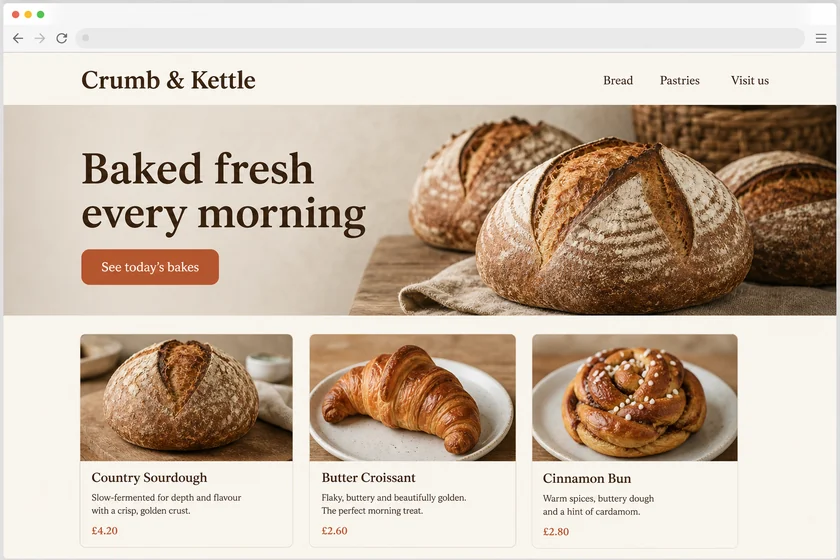
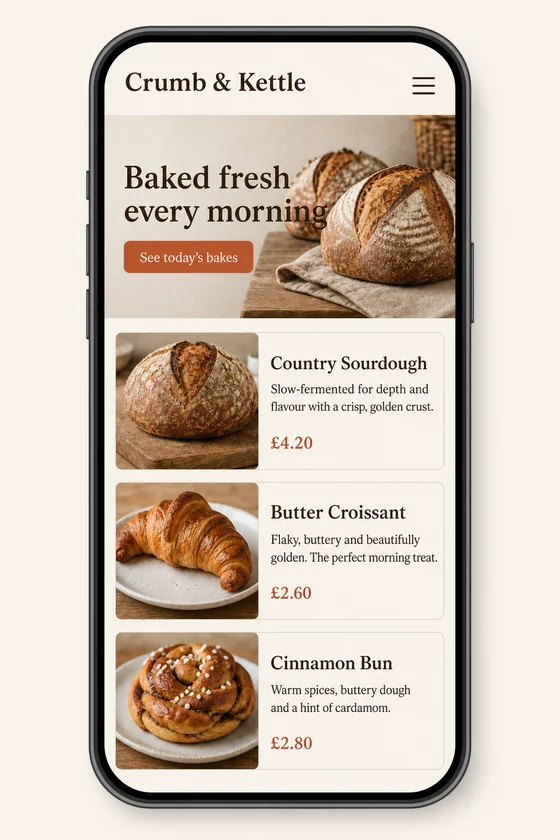
File: PNG mock-up, about 1.5 megapixels. A picture of the design for the client's developer, not HTML code or a Figma file.
Client: Crumb & Kettle, a neighbourhood bakery. Task: show how their homepage should look on a phone, keeping the fonts, colours, button and photos of the desktop site.
The client and all details are made up.
A tablet screen is not a stretched phone: the extra width usually goes into a sidebar for navigation, two columns such as a list on the left and details on the right, larger cards in a grid and comfortable margins, in portrait or landscape. Upload screenshots of your phone app, and we draw the same screens laid out for a tablet in your colours, fonts, icons and buttons, keeping your content and its order. You get PNG mock-ups of about 1.5 megapixels, each made from one of your screenshots and in its shape, so a tall phone screenshot gives an upright picture and a wide one, such as your web app or a landscape tablet sample, gives a landscape picture; they are not app code or a Figma, Sketch or XD file.
Up to 5 sharp screenshots of your phone app as PNG, JPEG or WebP (no PDF), one screen each, and only files you have the right to use; a tablet sample from another app guides only the style. For a landscape tablet screen, upload a wide image; say which screens should become two-column and where navigation should go, and keep any new labels short, as Latin-script languages draw most cleanly.
We will ask you:
| Packages | Basic1 tablet screen$10 | Standard3 tablet screens$22 | Premium5 tablet screens$39 |
|---|---|---|---|
| Deadline | 1 day | 1 day | 2 days |
| Revisions | 1 | 2 | 3 |
| Mock-ups | 1 | 3 | 5 |
| Format | PNG | PNG | PNG |
| Screens | your choice | your choice | your choice |
| Order Basic | Order Standard | Order Premium |
You pay when you order, but the money is released only for accepted work.
Each picture takes the shape of the file it is made from. A phone screenshot gives an upright picture, good for a tablet held upright; for landscape, upload a wide image, such as your web app on a laptop or a landscape tablet sample you like.
We lay the screens out the way tablet apps usually work, with side navigation and split views, but platform details change, so your developer should check Apple's and Google's current guidelines for large screens.
No, you get still PNG pictures, not app code, adaptive layout rules or a Figma, Sketch or XD file. Small labels can come out imperfect, so check them and ask for a revision.
Another app's tablet screens guide only the style: layout, mood and colours, never its logo, brand or texts. We add no other brands' logos, invented ratings or reviews and never change documents. The picture is redrawn, so small icons and your logo may change slightly.
Did not find your answer?
Design Design
 Design
 Design