 Development
Word list moderation bot
A Discord moderation bot in Python: removes messages with words from your list and tells your moderators
Pricefrom $25
The money is reserved when you pay and released only once you accept the work.
async def booking_done(update: Update, context: ContextTypes.DEFAULT_TYPE) -> int:
    """The last step of the form: thanks the client and passes the request on."""
    request = context.user_data["booking"]
    request["phone"] = update.message.text.strip()
    await update.message.reply_text(TEXTS["booking_thanks"], reply_markup=main_menu())
    await context.bot.send_message(settings.admin_chat_id, format_request(request))
    sheet.append_row([datetime.now().isoformat(timespec="minutes"), *request.values()])
    return ConversationHandler.END
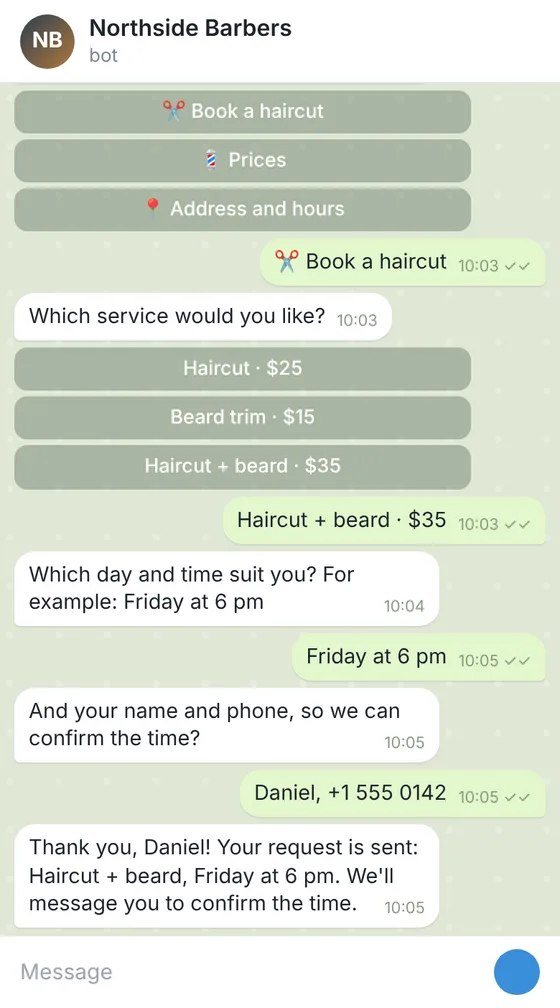
All the answers and buttons are in texts.yaml, so the client changes a price or the hours without touching the code.
Files: a ZIP archive with bot.py, texts.yaml, settings.example.env (where the bot token and the sheet go, filled in by the client), requirements.txt and a README: creating the bot in Telegram, connecting the Google Sheet and running it on a small server or hosting. The bot sends the request but does not check the barbers' calendar: the owner confirms the time.
Client: a barbershop with 3 barbers that took bookings only by phone. Task: a Telegram bot with a menu: prices, address and hours, a booking form (service, day and time, name, phone) that sends each request to the owner's chat and adds it to a Google Sheet.
The client and all details are made up.
A Discord server feels looked after when newcomers are greeted, read the rules and get the right roles straight away. This bot posts your welcome in the channel you choose when someone joins, shows the rules and offers buttons for self-picked roles, such as games or regions. Slash commands show the rules and answers again. From Standard, forms let members apply for a role that needs approval or report a problem, with answers in a channel of yours and a Google Sheet. In Premium, admin commands change the welcome and roles, and announcements go to your channels and to members who opened a chat with the bot. The bot gives only the roles you list and does not ban, kick or judge anyone. The README shows how to create it on Discord's Applications page, invite it and run it on your computer, server or a hosting with Python. It takes no payments; hosting and the token are yours.
What your server is about and the channel for welcomes; the welcome text and rules exactly as they should read; the roles members may pick, with a button label for each; the answers for the slash command; for Standard and Premium, the questions of each form and the channel they should go to. Never send the bot's token or any passwords: the README shows where you put them yourself.
We will ask you:
| Packages | BasicWelcome and roles$26 | StandardWelcome with forms$49 | PremiumServer bot with admin tools$84 |
|---|---|---|---|
| Deadline | 1 day | 2 days | 3 days |
| Revisions | 1 | 2 | 3 |
| Platform | Discord | Discord | Discord |
| Ready answers | up to 10 | up to 25 | up to 40 |
| Forms (request, booking, order) | No | up to 3 | up to 5 |
| Requests sent to your chat and a Google Sheet | No | Yes | Yes |
| Admin commands and broadcasts | No | No | Yes |
| Languages of the menu | 1 | 1 | 2 |
| Roles picked by buttons | up to 5 | up to 10 | up to 15 |
| Order Basic | Order Standard | Order Premium |
You pay when you order, but the money is released only for accepted work.
Discord lets a bot give only roles placed below its own role in the server settings. The README shows how to move the bot's role up.
No. It welcomes members, shows the rules and gives roles from your list. Bans, kicks and message filters are not part of this bot; your moderators decide.
No. It posts in your channels and writes privately only to members who opened a chat with it, within Discord's rules.
No. The bot takes no payments. It can give a link to your own payment page, and an admin gives the role after checking.
On your computer, server or a hosting with Python; it must be running to greet people. The token stays with you, and WhatsApp is not part of this service.
Did not find your answer?
Development Development
 Development
 Development