Payment protectionDetails
- Revisions within the package are free.
- If you do not respond within 3 days of delivery, the work is accepted automatically.
The money is reserved when you pay and released only once you accept the work.

Example result
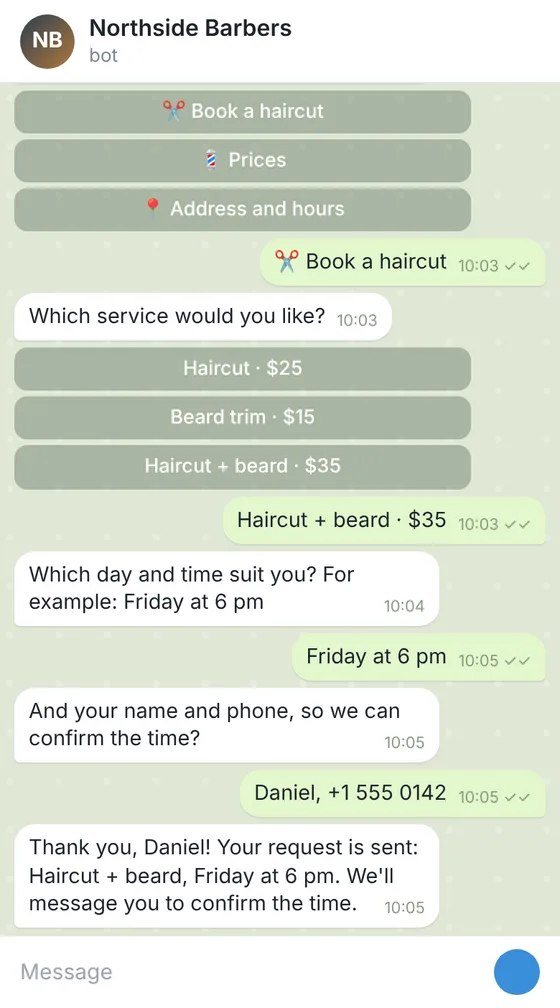
Telegram bot for booking haircuts at a barbershop
The bot in Telegram
A part of the code
async def booking_done(update: Update, context: ContextTypes.DEFAULT_TYPE) -> int:
    """The last step of the form: thanks the client and passes the request on."""
    request = context.user_data["booking"]
    request["phone"] = update.message.text.strip()
    await update.message.reply_text(TEXTS["booking_thanks"], reply_markup=main_menu())
    await context.bot.send_message(settings.admin_chat_id, format_request(request))
    sheet.append_row([datetime.now().isoformat(timespec="minutes"), *request.values()])
    return ConversationHandler.END
All the answers and buttons are in texts.yaml, so the client changes a price or the hours without touching the code.
Files: a ZIP archive with bot.py, texts.yaml, settings.example.env (where the bot token and the sheet go, filled in by the client), requirements.txt and a README: creating the bot in Telegram, connecting the Google Sheet and running it on a small server or hosting. The bot sends the request but does not check the barbers' calendar: the owner confirms the time.
Client: a barbershop with 3 barbers that took bookings only by phone. Task: a Telegram bot with a menu: prices, address and hours, a booking form (service, day and time, name, phone) that sends each request to the owner's chat and adds it to a Google Sheet.
The client and all details are made up.
About this service
In a beauty salon the phone and messages are busy with the same things: what a service costs, how long it takes, who is free on Saturday. This Telegram bot answers with your price list and service descriptions from buttons and, from Standard, takes a booking request: the service, the master the client prefers, the day and time that suit them, a name and phone. The request comes to your chat and a Google Sheet, and the salon confirms the time or offers another. The bot does not see your schedule or booking system and does not check whether a slot is free, so it never confirms a visit itself. We write the Python code and a README on creating the bot in @BotFather and running it on your computer, server or a hosting. It gives no advice on procedures beyond your texts, takes no payments or deposits, and the token stays with you.
What is included
- What you getA ZIP archive with the Python code, your services and prices in a texts file, an example settings file and a README; the code is also shown on the order page.
- Price list by buttonsHair, nails, brows or whatever sections you have
- Booking requestsService, master, day and time in one message, from Standard
- You confirmThe bot tells the client that the salon will confirm the time
- Your words onlyDescriptions and prices exactly as you give them
- Offers to regularsBroadcasts to clients who started the bot, in Premium
How it works
- 1ServicesYou give the services, prices, masters and booking questions
- 2CodeWe write the bot and a step-by-step launch guide
- 3LaunchYou create the bot, put in the token and run it
- 4ChangesYou ask for changes within your package
What we need from you
Your services with prices and duration as text; the names of the masters, if clients may choose one; address, opening hours and how to find you; the questions of the booking form, the chat where requests should go and the text the client sees after sending a request. Never send the bot's token or any passwords: the README shows where you put them yourself.
We will ask you:
- Services and prices
- Masters
- The booking form
- Where requests go
Compare packages
| Packages | BasicServices and prices bot$26 | StandardBooking request bot$49 | PremiumSalon bot with broadcasts$84 |
|---|---|---|---|
| Deadline | 1 day | 2 days | 3 days |
| Revisions | 1 | 2 | 3 |
| Platform | Telegram | Telegram | Telegram |
| Ready answers | up to 10 | up to 25 | up to 40 |
| Forms (request, booking, order) | No | up to 3 | up to 5 |
| Requests sent to your chat and a Google Sheet | No | Yes | Yes |
| Admin commands and broadcasts | No | No | Yes |
| Languages of the menu | 1 | 1 | 2 |
| Order Basic | Order Standard | Order Premium |
Payment protection
You pay when you order, but the money is released only for accepted work.
- Fixed priceThe package price does not change after you pay.
- The money is reservedWhen you pay, the amount is only reserved. It is released to the service once you accept the work.
- Checked before deliveryEvery result goes through a quality check before it reaches you, and you see it on the order page before accepting it.
- Free revisionsAsk for changes within your brief as many times as the package allows.
- Acceptance after 3 daysIf within 3 days of delivery you neither accept the work nor ask for changes, it is accepted automatically. If you write in the order chat after delivery, the order waits; once we answer, we may start the 3 days again and will say so in the chat.
- Redo or a full refundIf the result does not match your brief and the revisions did not fix it, or the work takes more than twice its deadline, write in the order chat: we will redo the work or refund the payment in full.
Questions and answers
Will the bot show free slots?
No. It does not connect to your schedule or booking system and does not check a calendar. It takes the wished day and time and sends the request to you; you confirm or offer another time.
Can it take a deposit?
No, the bot takes no payments. If you take deposits, it can give a link to your own payment page.
Can clients cancel or move a visit?
A change or cancellation form can be one of your forms. It sends the request to you, and you change the booking yourself.
Will it remind clients of their visit?
Not in Basic or Standard. In Premium an admin command can send a message to a client who started the bot; it cannot write to anyone who has not.
Where does it run, and can it be on WhatsApp?
It runs on your computer, server or a hosting with Python, and the token stays with you. This service makes Telegram bots only, not WhatsApp ones.
Did not find your answer?