 Development
Leave request bot
A Slack leave request bot in Python: a short form with dates and type, sent to an approval channel and a sheet
Pricefrom $25
The money is reserved when you pay and released only once you accept the work.
async def booking_done(update: Update, context: ContextTypes.DEFAULT_TYPE) -> int:
    """The last step of the form: thanks the client and passes the request on."""
    request = context.user_data["booking"]
    request["phone"] = update.message.text.strip()
    await update.message.reply_text(TEXTS["booking_thanks"], reply_markup=main_menu())
    await context.bot.send_message(settings.admin_chat_id, format_request(request))
    sheet.append_row([datetime.now().isoformat(timespec="minutes"), *request.values()])
    return ConversationHandler.END
All the answers and buttons are in texts.yaml, so the client changes a price or the hours without touching the code.
Files: a ZIP archive with bot.py, texts.yaml, settings.example.env (where the bot token and the sheet go, filled in by the client), requirements.txt and a README: creating the bot in Telegram, connecting the Google Sheet and running it on a small server or hosting. The bot sends the request but does not check the barbers' calendar: the owner confirms the time.
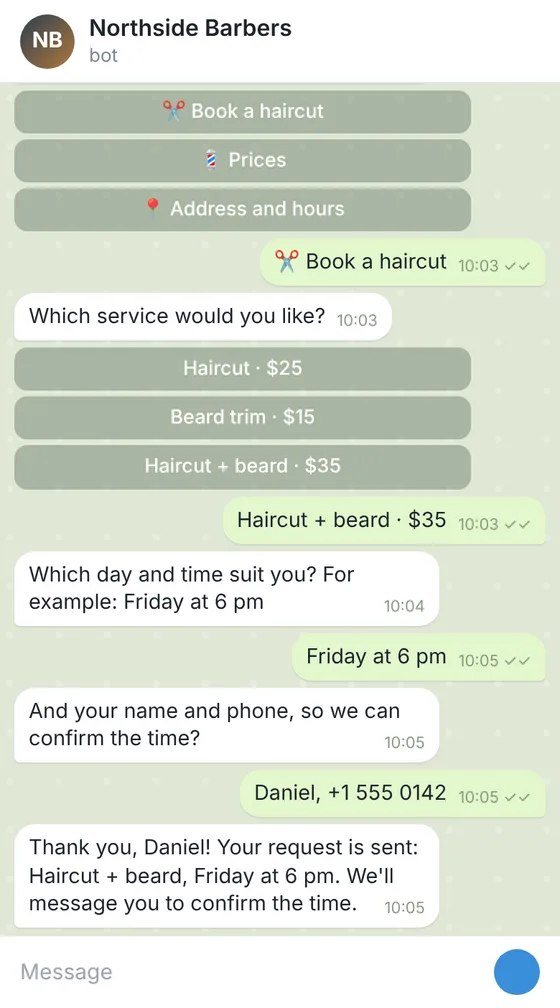
Client: a barbershop with 3 barbers that took bookings only by phone. Task: a Telegram bot with a menu: prices, address and hours, a booking form (service, day and time, name, phone) that sends each request to the owner's chat and adds it to a Google Sheet.
The client and all details are made up.
Written stand-ups save a daily call, but someone has to remind people and gather the answers. This Slack bot does that. From Standard, a slash command opens a short form with your questions, such as yesterday, today and blockers, and posts each person's answers to your stand-up channel and a Google Sheet. In Premium the bot reminds everyone who opened its chat at your time on working days, and admin commands change the time, skip a day or show who has not answered. Basic gives answers only: how your stand-ups work, the questions and links to your boards. The bot does not judge progress, write summaries or read other tools, and takes no payments. It runs in Socket Mode, so it needs no public web address. The README shows how to create the app in your Slack workspace and run it on your computer, server or a hosting with Python. Hosting and the tokens are yours.
Your stand-up questions exactly as people should read them; the channel where answers go; the answers for Basic (how stand-ups work, links to your boards and notes); for Premium, the reminder time, time zone, working days and the Slack users who may use admin commands. Never send the bot's tokens, a Google access key or any passwords: the README shows where you put them yourself.
We will ask you:
| Packages | BasicStand-up help bot$26 | StandardStand-up form bot$49 | PremiumDaily stand-up bot$84 |
|---|---|---|---|
| Deadline | 1 day | 2 days | 3 days |
| Revisions | 1 | 2 | 3 |
| Platform | Slack | Slack | Slack |
| Ready answers | up to 10 | up to 25 | up to 40 |
| Forms (request, booking, order) | No | up to 3 | up to 5 |
| Requests sent to your chat and a Google Sheet | No | Yes | Yes |
| Admin commands and broadcasts | No | No | Yes |
| Languages of the menu | 1 | 1 | 2 |
| Daily reminder at a set time | No | No | Yes |
| Order Basic | Order Standard | Order Premium |
You pay when you order, but the money is released only for accepted work.
You need the right to install apps in your workspace, or the help of someone who has it. The README shows each setting.
No. It connects to Slack in Socket Mode, so a computer or server that stays on is enough; it must be running to send reminders.
No. It writes to people who opened its chat and posts in channels it was added to, within Slack's rules.
No. It shows the links you give and the answers people type. It does not connect to other tools or write summaries.
No. This offer is a Slack bot; WhatsApp is not part of this service, and the bot takes no payments.
Did not find your answer?
Development Development
 Development
 Development