Payment protectionDetails
- Revisions within the package are free.
- If you do not respond within 3 days of delivery, the work is accepted automatically.
The money is reserved when you pay and released only once you accept the work.

Example result
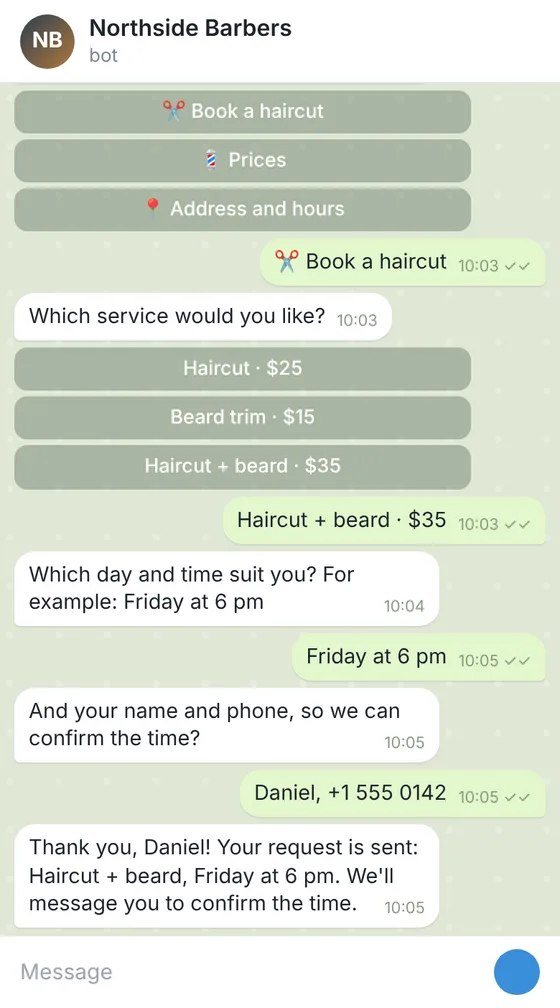
Telegram bot for booking haircuts at a barbershop
The bot in Telegram
A part of the code
async def booking_done(update: Update, context: ContextTypes.DEFAULT_TYPE) -> int:
    """The last step of the form: thanks the client and passes the request on."""
    request = context.user_data["booking"]
    request["phone"] = update.message.text.strip()
    await update.message.reply_text(TEXTS["booking_thanks"], reply_markup=main_menu())
    await context.bot.send_message(settings.admin_chat_id, format_request(request))
    sheet.append_row([datetime.now().isoformat(timespec="minutes"), *request.values()])
    return ConversationHandler.END
All the answers and buttons are in texts.yaml, so the client changes a price or the hours without touching the code.
Files: a ZIP archive with bot.py, texts.yaml, settings.example.env (where the bot token and the sheet go, filled in by the client), requirements.txt and a README: creating the bot in Telegram, connecting the Google Sheet and running it on a small server or hosting. The bot sends the request but does not check the barbers' calendar: the owner confirms the time.
Client: a barbershop with 3 barbers that took bookings only by phone. Task: a Telegram bot with a menu: prices, address and hours, a booking form (service, day and time, name, phone) that sends each request to the owner's chat and adds it to a Google Sheet.
The client and all details are made up.
About this service
In a busy group, new members ask what is allowed and where to find things, and the rules get lost in old messages. This Telegram bot greets each new member with your welcome text, the rules and buttons: the full rules, useful links, topics, who to write to; /rules shows them again at any time. From Standard, forms let members send a report or a question to the admins, and newcomers can fill in a short questionnaire, with answers in your chat and a Google Sheet. In Premium, admin commands change the welcome and rules without a restart, and broadcasts reach people who started the bot. The bot does not ban, mute or delete members' messages or judge who breaks the rules: your admins decide. It must be a group admin to see new members. We write the Python code and a README on running it on your computer, server or a hosting. It takes no payments; the token stays with you.
What is included
- What you getA ZIP archive with the Python code, the welcome and rules in a texts file, an example settings file and a README; the code is also shown on the order page.
- Welcome in the groupYour text with the new member's name
- Rules on demand/rules shows them again at any time
- Useful linksButtons to your chats, channel or website
- Reports to adminsA form that reaches your chat, from Standard
- Rules changed on the flyAdmin commands in Premium, no restart
How it works
- 1TextsYou give the welcome, rules, buttons and any forms
- 2CodeWe write the bot and the guide to running it
- 3LaunchYou create the bot, make it a group admin, add the token and run it
- 4ChangesYou ask for changes within your package
What we need from you
The group's name and what it is about; the welcome text and the rules exactly as they should read; the buttons and links to show; for Standard and Premium, the questions of each form and the chat where reports and answers should go; for Premium, the Telegram accounts that may use admin commands. Never send the bot's token or any passwords: the README shows where you put them yourself.
We will ask you:
- Your group
- Welcome text and rules
- Buttons and links
- Forms
Compare packages
| Packages | BasicWelcome and rules bot$25 | StandardWelcome bot with forms$49 | PremiumGroup bot with admin tools$85 |
|---|---|---|---|
| Deadline | 1 day | 2 days | 3 days |
| Revisions | 1 | 2 | 3 |
| Platform | Telegram | Telegram | Telegram |
| Ready answers | up to 10 | up to 25 | up to 40 |
| Forms (request, booking, order) | No | up to 3 | up to 5 |
| Requests sent to your chat and a Google Sheet | No | Yes | Yes |
| Admin commands and broadcasts | No | No | Yes |
| Languages of the menu | 1 | 1 | 2 |
| Order Basic | Order Standard | Order Premium |
Payment protection
You pay when you order, but the money is released only for accepted work.
- Fixed priceThe package price does not change after you pay.
- The money is reservedWhen you pay, the amount is only reserved. It is released to the service once you accept the work.
- Checked before deliveryEvery result goes through a quality check before it reaches you, and you see it on the order page before accepting it.
- Free revisionsAsk for changes within your brief as many times as the package allows.
- Acceptance after 3 daysIf within 3 days of delivery you neither accept the work nor ask for changes, it is accepted automatically. If you write in the order chat after delivery, the order waits; once we answer, we may start the 3 days again and will say so in the chat.
- Redo or a full refundIf the result does not match your brief and the revisions did not fix it, or the work takes more than twice its deadline, write in the order chat: we will redo the work or refund the payment in full.
Questions and answers
Can the bot ban spammers or delete messages?
No. It does not ban, mute or delete anything members write. It welcomes members, shows the rules and passes reports to your admins, who decide.
Will the welcomes flood the group?
You choose: the bot can delete its own previous welcome when it posts a new one, so only the latest stays.
Does it work in a channel?
It is made for groups, where members join and talk. A channel has no chat to greet people in, though the answers still work in a private chat with the bot.
Who keeps the questionnaire answers?
You: they go to your chat and your Google Sheet. Telling members how their answers are used is up to you.
Where does it run?
On your computer, server or a hosting with Python, and the token stays with you. It is for Telegram groups, not WhatsApp.
Did not find your answer?