 Design
Delivery calculator
A delivery cost calculator for your site: zone, weight and size counted by your rates in the browser
Pricefrom $21
The money is reserved when you pay and released only once you accept the work.

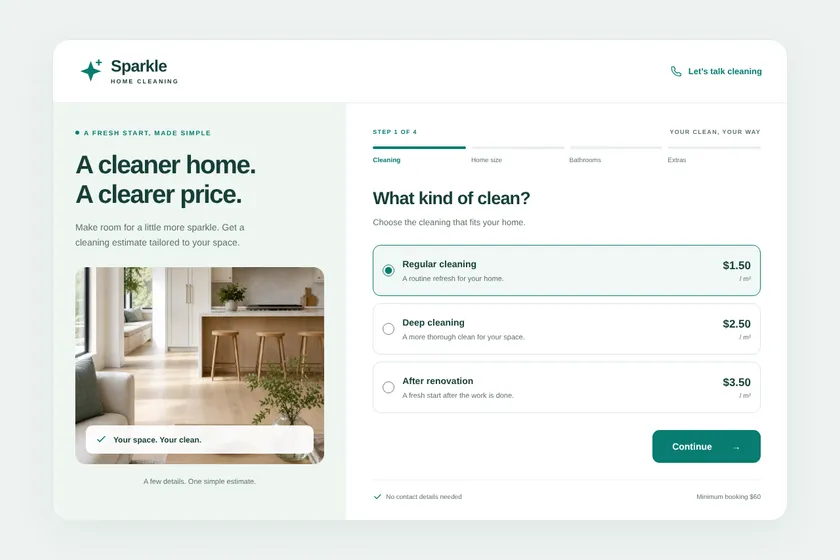
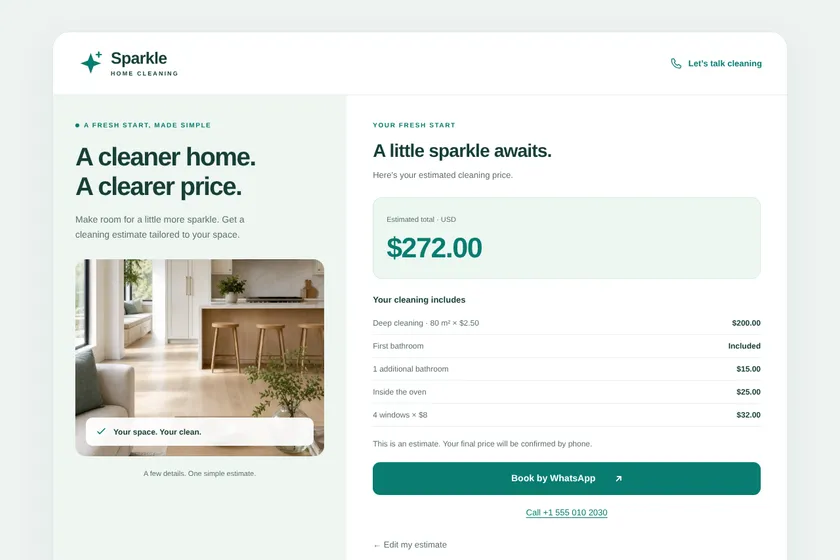

Files: a ZIP archive with the block's HTML, styles, script and 2 pictures, and an example page, ready to paste into the client's site. The pictures here are screenshots of the block.
Client: Sparkle Home Cleaning. Task: a calculator in four steps that works out the price of a cleaning from its type, the size of the home, the bathrooms and the extras, by the client's rates, and leads to booking by WhatsApp or phone.
The client and all details are made up.
A renovation calculator lets a visitor see roughly what their job will cost before they call you. Give us your rules: the price per square metre for each type of renovation, extra charges for bathrooms, demolition or materials, and the minimum order, and we build one block for your site: the texts, pictures drawn for it and the code. The visitor enters the area and picks options, the sum appears at once in the browser by your prices, and buttons offer to call or message you. It does not save or send answers and is not a booking form. The figure is only as close as your prices make it, so the block shows your note, such as that the final price follows a visit.
Your price list for the calculator: types of renovation with a price per m² or per job, extra charges and how they add up (for example +15% for an old building), the minimum order and the currency; the fields the visitor fills in; the note to show under the sum; where the buttons lead, exactly as they should appear; your site's colours. Optionally up to 5 pictures as PNG, JPEG or WebP: your logo or photos of your finished renovations that you have the right to use.
We will ask you:
| Packages | BasicQuick estimate$21 | StandardEstimate in steps$39 | PremiumEstimate with explanation$67 |
|---|---|---|---|
| Deadline | 1 day | 2 days | 3 days |
| Revisions | 1 | 2 | 3 |
| Blocks | 1 | 1 | 1 |
| Fields or questions | up to 5 | up to 10 | up to 15 |
| Steps with a progress bar | No | Yes | Yes |
| Results with explanation and advice | No | No | Yes |
| Pictures drawn for the block | 1 | 2 | 3 |
| Price unit | per m² or per job, as you set | per m² or per job, as you set | per m² or per job, as you set |
| Order Basic | Order Standard | Order Premium |
You pay when you order, but the money is released only for accepted work.
It shows what your prices give for the visitor's answers, nothing more. Real jobs depend on walls, wiring and materials, so your note sits under the sum, and the exact price is yours to set once you see the place.
Yes, if you give a rule for them, such as a price per m² for each finish level. We don't look up or invent material prices.
No. The block does not save or send anything visitors enter. After the result it offers buttons to call you, write to you or message you. Collecting requests needs a form service, which is not part of this service.
Yes. The prices and rules sit in script.js, in plain JavaScript, and can be changed in any code editor. Within your package you can also ask us for changes on the order page.
Did not find your answer?
Design Design
 Design
 Design