 Design
Holiday greeting email
Holiday greeting email in your email style
Pricefrom $10
The money is reserved when you pay and released only once you accept the work.
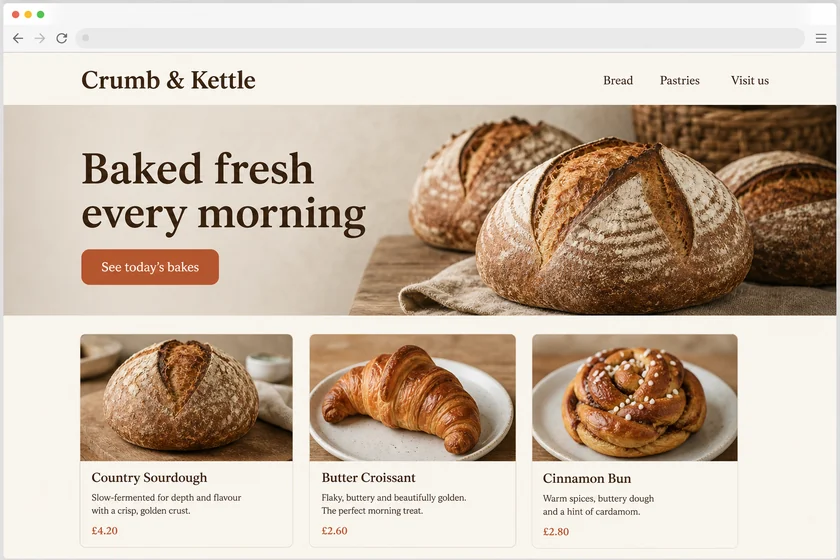
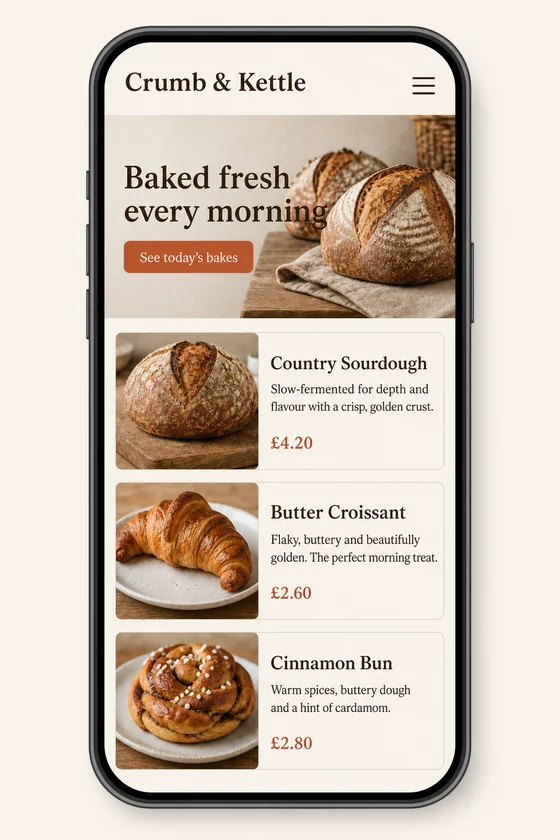
File: PNG mock-up, about 1.5 megapixels. A picture of the design for the client's developer, not HTML code or a Figma file.
Client: Crumb & Kettle, a neighbourhood bakery. Task: show how their homepage should look on a phone, keeping the fonts, colours, button and photos of the desktop site.
The client and all details are made up.
An event invitation email has to answer what, when and where before anything else, then give a reason to come, such as the speakers, the agenda or what guests will take away, and end with one button to register or reply, plus an add-to-calendar link. We draw invitations to your webinar, launch, workshop, open day or party in the style of your past emails, so the invite is clearly from you. Each picture is made from one of your screenshots as an upright 2:3 PNG mock-up of about 1.5 megapixels, like an email opened on a phone, whatever the shape of the upload; it is a picture, not HTML code, a registration page or an email template.
Up to 5 sharp screenshots of your emails or site as PNG, JPEG or WebP (no PDF), from files you have the right to use, or a sample used only for its style. Send the event name, date, time with time zone, place or online format, agenda points, speaker names and the button label exactly as they should read.
We will ask you:
| Packages | Basic1 email$10 | Standard3 emails$22 | Premium5 emails$39 |
|---|---|---|---|
| Deadline | 1 day | 1 day | 2 days |
| Revisions | 1 | 2 | 3 |
| Mock-ups | 1 | 3 | 5 |
| Format | PNG | PNG | PNG |
| Screens | your choice | your choice | your choice |
| Order Basic | Order Standard | Order Premium |
You pay when you order, but the money is released only for accepted work.
Each picture is made from one of your uploads, so a speaker photo appears only if it is in that screenshot and you have the right to use it; otherwise we show a neutral placeholder. Faces and small details are redrawn and can change slightly, so your developer drops in the real photos when building the email.
We don't draw other brands' logos; the platform name can appear as plain text, such as "Online via Zoom". We also don't invent sponsors, ratings or awards, and never change documents, tickets or official forms.
The date, time and names you give us are drawn into the picture, but small text can come out imperfect and Latin-script text works best, so check every digit and spelling. Each picture is an upright 2:3 picture like an email on a phone, even from a wide screenshot.
You get PNG pictures, not HTML code, not a Figma file and not a template for Mailchimp, Eventbrite, HubSpot or another tool, and we change nothing in your accounts. You or your developer rebuild the invite in your editor with live text and working links.
Did not find your answer?
Design Design
 Design
 Design