 Development
Pricefrom $18
The money is reserved when you pay and released only once you accept the work.

async def booking_done(update: Update, context: ContextTypes.DEFAULT_TYPE) -> int:
    """The last step of the form: thanks the client and passes the request on."""
    request = context.user_data["booking"]
    request["phone"] = update.message.text.strip()
    await update.message.reply_text(TEXTS["booking_thanks"], reply_markup=main_menu())
    await context.bot.send_message(settings.admin_chat_id, format_request(request))
    sheet.append_row([datetime.now().isoformat(timespec="minutes"), *request.values()])
    return ConversationHandler.END
All the answers and buttons are in texts.yaml, so the client changes a price or the hours without touching the code.
Files: a ZIP archive with bot.py, texts.yaml, settings.example.env (where the bot token and the sheet go, filled in by the client), requirements.txt and a README: creating the bot in Telegram, connecting the Google Sheet and running it on a small server or hosting. The bot sends the request but does not check the barbers' calendar: the owner confirms the time.
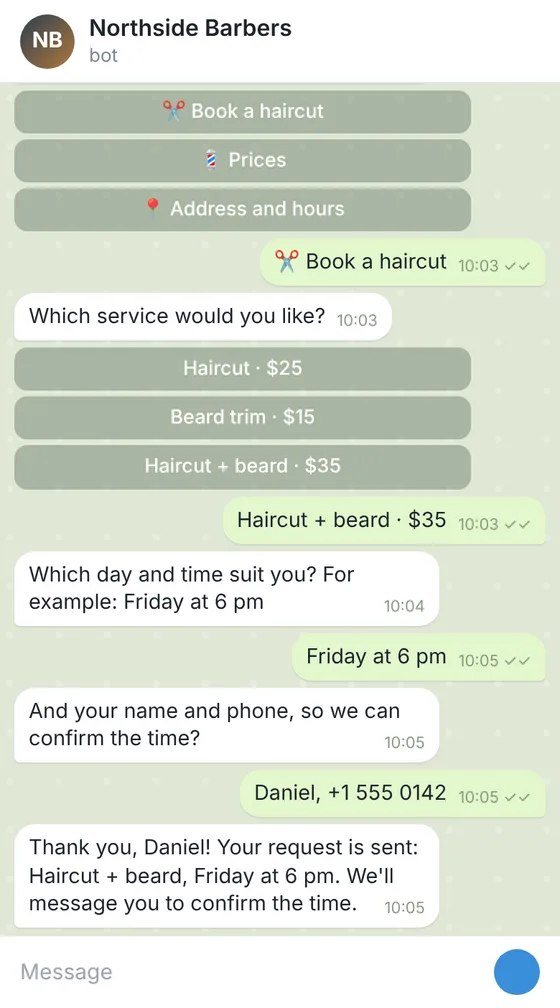
Client: a barbershop with 3 barbers that took bookings only by phone. Task: a Telegram bot with a menu: prices, address and hours, a booking form (service, day and time, name, phone) that sends each request to the owner's chat and adds it to a Google Sheet.
The client and all details are made up.
A ready-made booking request bot: a typical version that is already worked out, adapted with your details. Clients open it in Telegram, Discord or Slack, see your services, prices and opening hours behind buttons and, from Standard, fill in a short request: the service, a preferred day and time, a name and a phone number. The request comes to your chat and a Google Sheet, and you confirm the time with the client yourself. It suits a salon, a clinic reception, a tutor, a repair shop or a studio. You send your services with prices, your hours, address and the questions of the form; we put them into the bot and write a README on creating it, getting the token and running it. The bot does not check a calendar, hold a time, send confirmations or take payments. Hosting it and keeping it running are on your side.
The platform: Telegram, Discord or Slack. Your services with prices and how long each takes, your opening hours and address, exactly as clients should see them. The questions of the booking form, for example service, day, time, name and phone, and where requests should go: your chat, a group of your employees or a Google Sheet. Never send the bot's token or passwords: the README shows where you put them yourself.
We will ask you:
| Packages | BasicServices and contacts$19 | StandardBooking request form$39 | PremiumBookings with broadcasts$65 |
|---|---|---|---|
| Deadline | 1 day | 2 days | 3 days |
| Revisions | 1 | 2 | 3 |
| Platform | Telegram, Discord or Slack | Telegram, Discord or Slack | Telegram, Discord or Slack |
| Ready answers | up to 10 | up to 25 | up to 40 |
| Forms (request, booking, order) | No | up to 3 | up to 5 |
| Requests sent to your chat and a Google Sheet | No | Yes | Yes |
| Admin commands and broadcasts | No | No | Yes |
| Languages of the menu | 1 | 1 | 2 |
| Ready-made version | Booking requests | Booking requests | Booking requests |
| Order Basic | Order Standard | Order Premium |
You pay when you order, but the money is released only for accepted work.
No. It takes the request with the day and time the client prefers and sends it to you; you check your schedule and confirm with the client. It does not connect to a calendar or a booking system.
It is a ready-made, typical booking bot: its screens and steps are already worked out, and we adapt it with your services, texts and form questions. A bot with its own logic is the custom chat bot service.
Each request goes to your chat and your Google Sheet; the bot keeps nothing else. The Premium bot keeps only the chat IDs of subscribers for broadcasts. Telling clients how you use their data is up to you.
No. It can give a link to your own payment page, but it takes no payments itself.
On a computer, a server or a hosting that runs Python, which you choose and pay for. While the program is running, the bot answers. We do not host bots for clients.
Did not find your answer?
Development Development
 Development
 Development