 Development
Job application bot
A Telegram bot for job applications in Python: your vacancies, a short application form and a CV sent to you
Pricefrom $26
The money is reserved when you pay and released only once you accept the work.

async def booking_done(update: Update, context: ContextTypes.DEFAULT_TYPE) -> int:
    """The last step of the form: thanks the client and passes the request on."""
    request = context.user_data["booking"]
    request["phone"] = update.message.text.strip()
    await update.message.reply_text(TEXTS["booking_thanks"], reply_markup=main_menu())
    await context.bot.send_message(settings.admin_chat_id, format_request(request))
    sheet.append_row([datetime.now().isoformat(timespec="minutes"), *request.values()])
    return ConversationHandler.END
All the answers and buttons are in texts.yaml, so the client changes a price or the hours without touching the code.
Files: a ZIP archive with bot.py, texts.yaml, settings.example.env (where the bot token and the sheet go, filled in by the client), requirements.txt and a README: creating the bot in Telegram, connecting the Google Sheet and running it on a small server or hosting. The bot sends the request but does not check the barbers' calendar: the owner confirms the time.
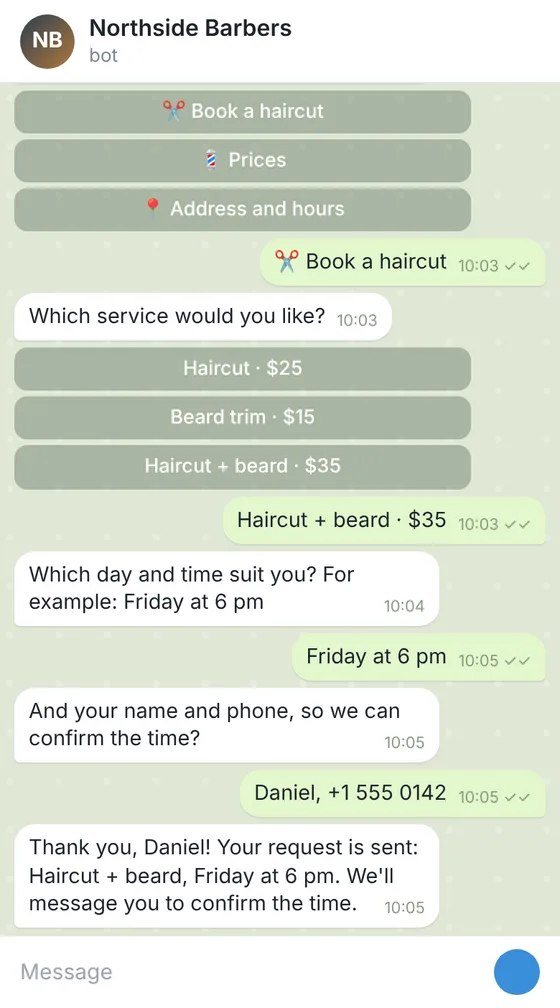
Client: a barbershop with 3 barbers that took bookings only by phone. Task: a Telegram bot with a menu: prices, address and hours, a booking form (service, day and time, name, phone) that sends each request to the owner's chat and adds it to a Google Sheet.
The client and all details are made up.
Car service customers ring with the same questions: do you do this job, roughly how much, when can I come. This Telegram bot answers with your services and prices from buttons and, from Standard, takes a booking request: the car's make and year, the plate if you need it, what is wrong or which service is wanted, the day that suits and a phone. The request lands in your chat and a Google Sheet, and you confirm the time: the bot does not see your workshop calendar or hold a bay. It does not diagnose faults or estimate repairs beyond the prices you give, and it gives no safety advice of its own. In Premium, admin commands and a broadcast send seasonal offers, such as tyre change time, to customers who started the bot. We write the Python code and a README on running it on your computer, server or a hosting. It takes no payments; hosting and the token are yours.
Your services and prices as text, with 'from' prices if you use them; opening hours, the address and how to drive in; the questions of the booking form (car, year, issue, wished day, phone) and the chat where bookings should go; the text the customer reads after booking. Never send the bot's token or any passwords: the README shows where you put them yourself.
We will ask you:
| Packages | BasicServices and prices bot$25 | StandardCar service booking bot$50 | PremiumService bot with broadcasts$86 |
|---|---|---|---|
| Deadline | 1 day | 2 days | 3 days |
| Revisions | 1 | 2 | 3 |
| Platform | Telegram | Telegram | Telegram |
| Ready answers | up to 10 | up to 25 | up to 40 |
| Forms (request, booking, order) | No | up to 3 | up to 5 |
| Requests sent to your chat and a Google Sheet | No | Yes | Yes |
| Admin commands and broadcasts | No | No | Yes |
| Languages of the menu | 1 | 1 | 2 |
| Order Basic | Order Standard | Order Premium |
You pay when you order, but the money is released only for accepted work.
No. It does not check a calendar or your workshop software. It takes the wished day and sends the request; you confirm or offer another time.
Only by the price list you give. It does not diagnose or work out repair costs; for anything else, the form sends the details to you.
No, the bot takes no payments; it can give a link to your own payment page.
In Premium, by an admin command, the bot can send a message to a customer who started it. It cannot write to anyone who has not.
On your computer, server or a hosting with Python; the token stays with you. WhatsApp is not part of this service.
Did not find your answer?
Development Development
 Development
 Development